




Game Kingdom
Instant Activation via LootBar
Product Details
About the Outer Wilds
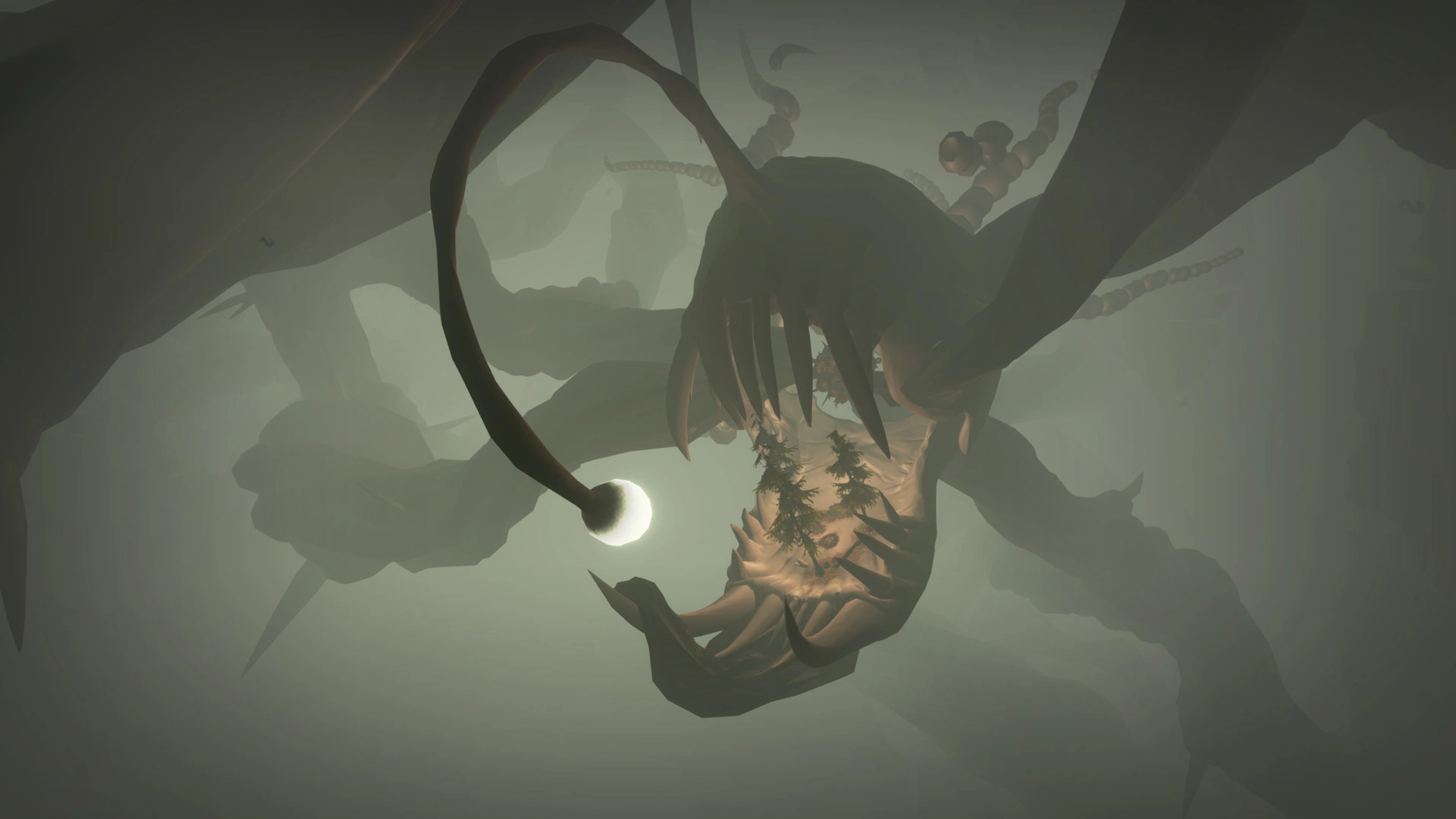
Outer Wilds is a first-person open world built around exploration and mystery. You join Outer Wilds Ventures as its newest recruit, waking to a solar system caught in a time loop. Planets reset with each cycle. Every outing demands both curiosity and caution.
You take off in your ship, follow distant signals, and read alien ruins while worlds shift around you. Sand swallows an underground city on one globe. Another breaks apart under your feet. Oxygen runs low, weather turns hostile, and your tools let you probe, photograph, and ready yourself for the next loop.
Your route, your priorities, and your arrival times decide what you actually find. The loop forces you to treat timing as strategy, and every run ends up feeling different. Discovery itself is what keeps you coming back to this quiet, adventurous space odyssey.
What is the Outer Wilds key?
Steam game key is an official activation code. Activate it on the platform after purchase to add the game to your account.
Two ways to go. Self-activation puts the game right into your library. The standard route hands you the key to activate yourself according to the activation guide.
Outer Wilds Review
Outer Wilds drops you into a handcrafted solar system on a time loop. You explore, puzzle things out, and a haunting score follows you. The pacing stays contemplative. Navigation feels clumsy. Some clues are obscure and grate. The revelations stick anyway, and the atmosphere makes the trip hard to forget.
System Requirements
User Reviews




FAQ
How to activate Outer Wilds key on Steam?
Your key arrives by email or LootBar system Notification after purchase. Launch Steam, head to Games, then Activate a Product on Steam... The rest shows up on screen. You can also activate through a browser by visiting Steam's key activation page. For hands-free activation, use LootBar self-activate service.
Is this Outer Wilds key region locked?
Yes, this key is region locked. Check the game description for which regions work.
Which platforms does Outer Wilds support?
PC, PS5, PS4, Xbox Series X/S, Xbox One, Nintendo Switch
Does Outer Wilds support cross-platform compatibility?
Outer Wilds has no cross-platform play. It's built strictly for solo play, so nothing connects across platforms. The Steam page tags it Single-player only — no online, no co-op, and therefore no cross-play or multiplayer of any kind.
Can Outer Wilds saves move between platforms?
Outer Wilds skips cross-platform cross-save. Steam Cloud keeps saves synced across your Steam devices — Windows PC, Steam Deck, and the like. The Steam page doesn't show any way to carry progression to consoles or other storefronts.
Can you play Outer Wilds with other players?
Outer Wilds does not support multiplayer. It’s a single‑player only experience with no co‑op or online modes; you play solo through its open‑world time‑loop exploration and story from start to finish.
Are Outer Wilds keys authorized?
Yes. We get the keys straight from authorized distributors — nothing else.
Which countries and regions is Outer Wilds most popular in?
United States, China, United Kingdom, Germany, France, Canada, Brazil, Russia, Australia, Spain
Why buy Outer Wilds key on Lootbar?
Your key lands fast, activation is guaranteed, and support is there when you need it.
1. Instant Delivery. The key reaches you within 3 minutes of purchase.
2. Activation Guarantee. This Outer Wilds key is genuine, and we back successful activation.
3. 24/7 customer support. The team stays online around the clock for purchase questions or issues.
How to buy Outer Wilds key on Lootbar?
1. Head to LootBar and log in. No account? Register first.
2. Top menu first: open "Game keys" and choose "Outer Wilds".
3. Pick the key option you want.
4. Use "Buy Now", choose a payment method, and complete payment.
5. Enter the required details, then wait for delivery.
Game Kingdom