
Your search history is empty



Playstation Gift Card US
Fast
Safe
24/7
5.0
75
4k Sold
100% Refund if Your Code Is No Longer Valid · 24/7 Customer Support.Valid for PlayStation accounts in the United States.

- https://img.lootbar.com/file/6a3de4b4d5de0709970b151dgFkSECR603?fop=imageView/2/w/340/h/340GTA6 Pre-Order Sale$89.15-$10.85$100.00
- https://img.lootbar.com/file/69e1a044bf53f22dbce7eb4eZQ3NHw9A03?fop=imageView/2/w/340/h/340PSN Gift Card 100$$94.58-$5.42$100.00
- https://img.lootbar.com/file/69e1a013ba34556a20a6cf34psqalW1d03?fop=imageView/2/w/340/h/340PSN Gift Card 25$$23.65-$1.35$25.00
- https://img.lootbar.com/file/69e1a025ba34556a20a6cfae2D43M1wW03?fop=imageView/2/w/340/h/340PSN Gift Card 50$$47.29-$2.71$50.00
- https://img.lootbar.com/file/69e1a033bf53f22dbce7eaaaIwxMNJg903?fop=imageView/2/w/340/h/340PSN Gift Card 75$$70.94-$4.06$75.00
- https://img.lootbar.com/file/69e1a0535af9b2dd4a3633aeHqiuoVvi03?fop=imageView/2/w/340/h/340PSN Gift Card 150$$141.87-$8.13$150.00
- https://img.lootbar.com/file/69e1a068bed8c22903f9eb4cTfJGcwXF03?fop=imageView/2/w/340/h/340PSN Gift Card 200$$189.15-$10.85$200.00
- https://img.lootbar.com/file/69e1a07d91c21547a34f7b53zop8G16403?fop=imageView/2/w/340/h/340PSN Gift Card 250$$236.44-$13.56$250.00
Product Details
PlayStation Gift Card Type
Digital Gift Card / E-code
Applicable Region
Playstation US
NOTE:
1. To ensure successful redemption, we kindly recommend using it in the corresponding currency region.
2. If the gift card you attempt to redeem is not in your currency, it will be automatically converted if redeemable in your region. Not all gift card currencies can be redeemed in all regions.
Delivery Method
Auto delivery
(A PlayStation Store Code will be sent to your order completion page.)
Delivery Time
Within 3 minutes
How to redeem the PlayStation Store Code?
On Console (PS5/PS4)
1. Enter the PlayStation Store and select your profile from the top of the screen.
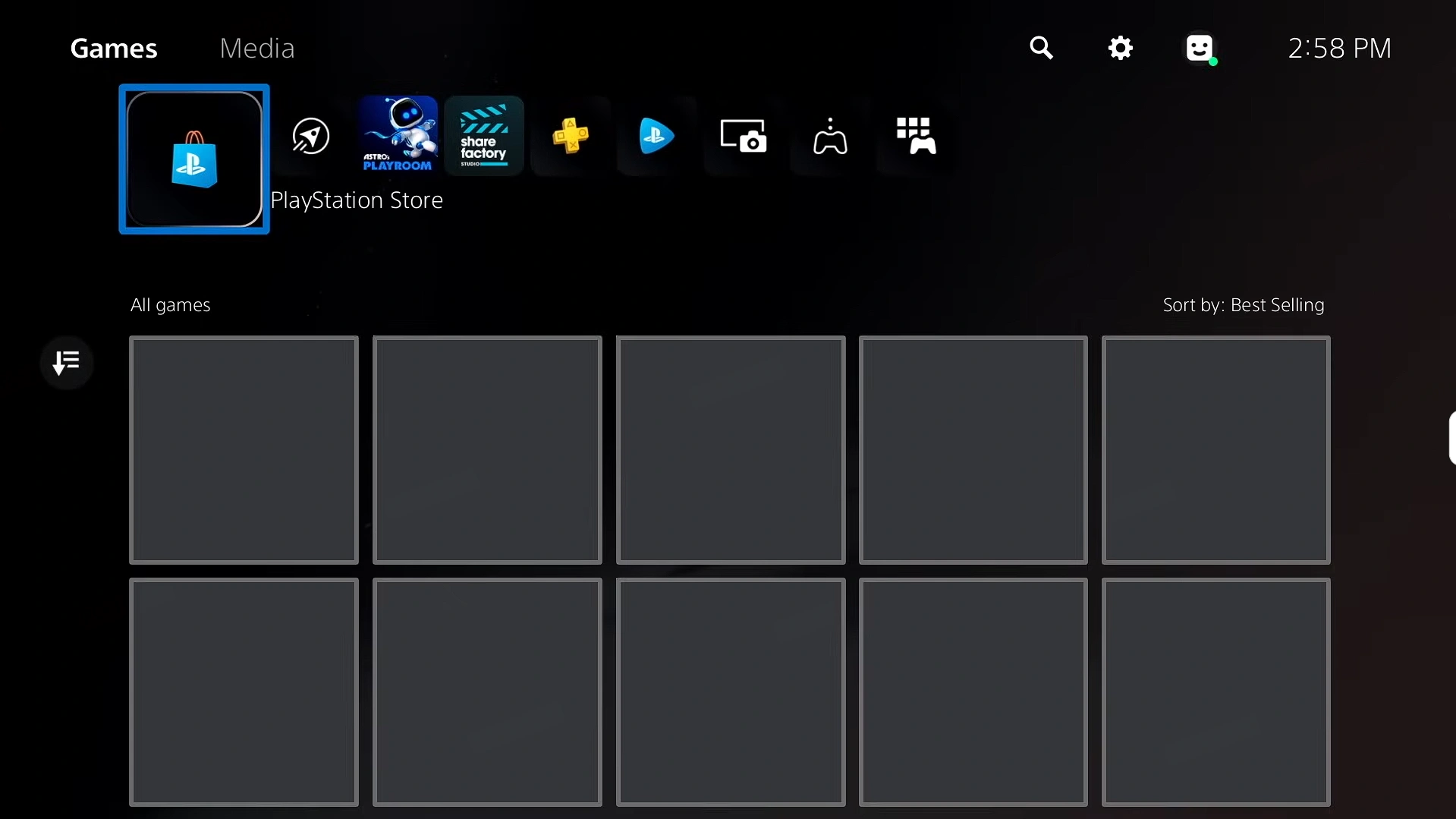
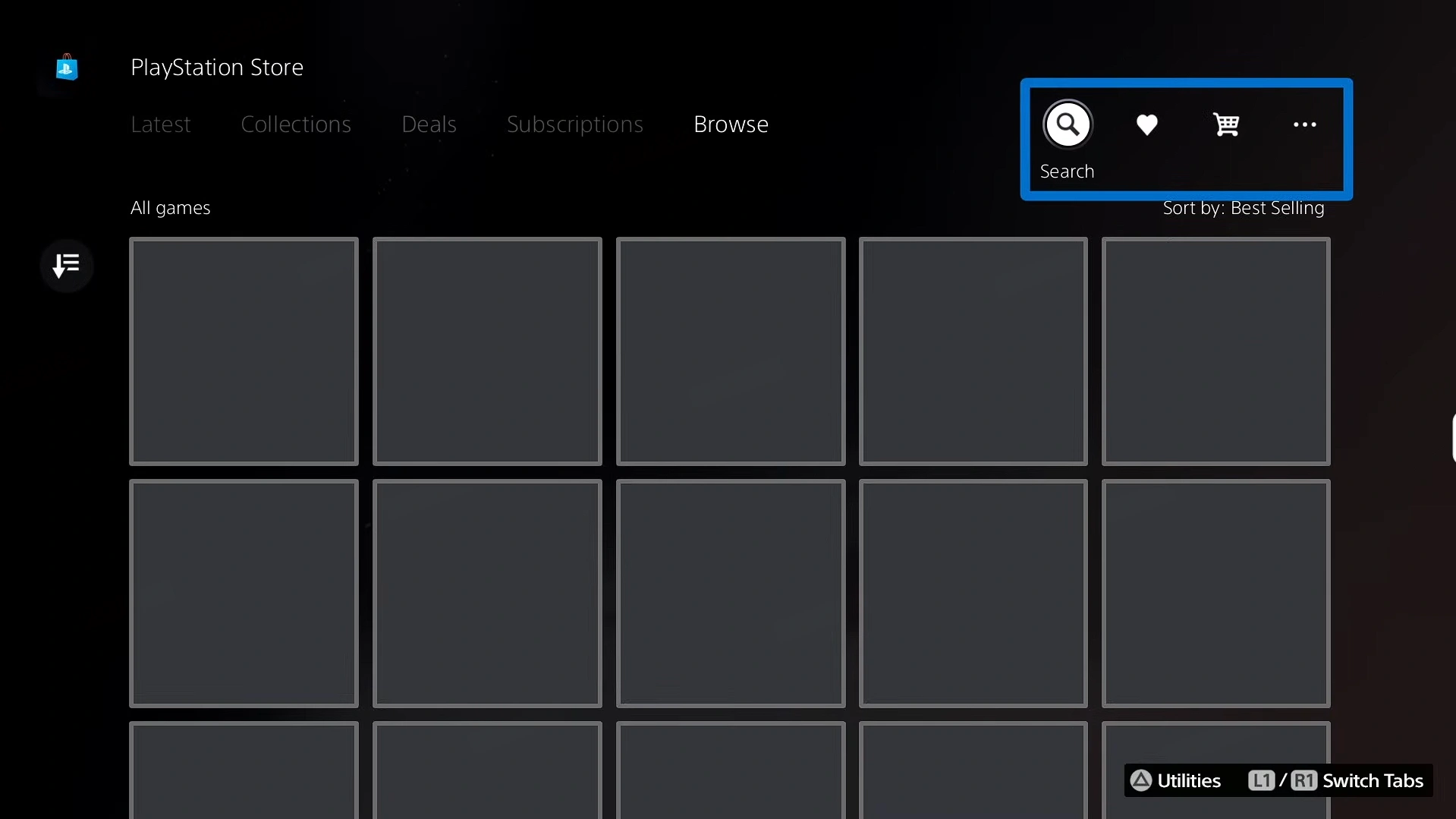
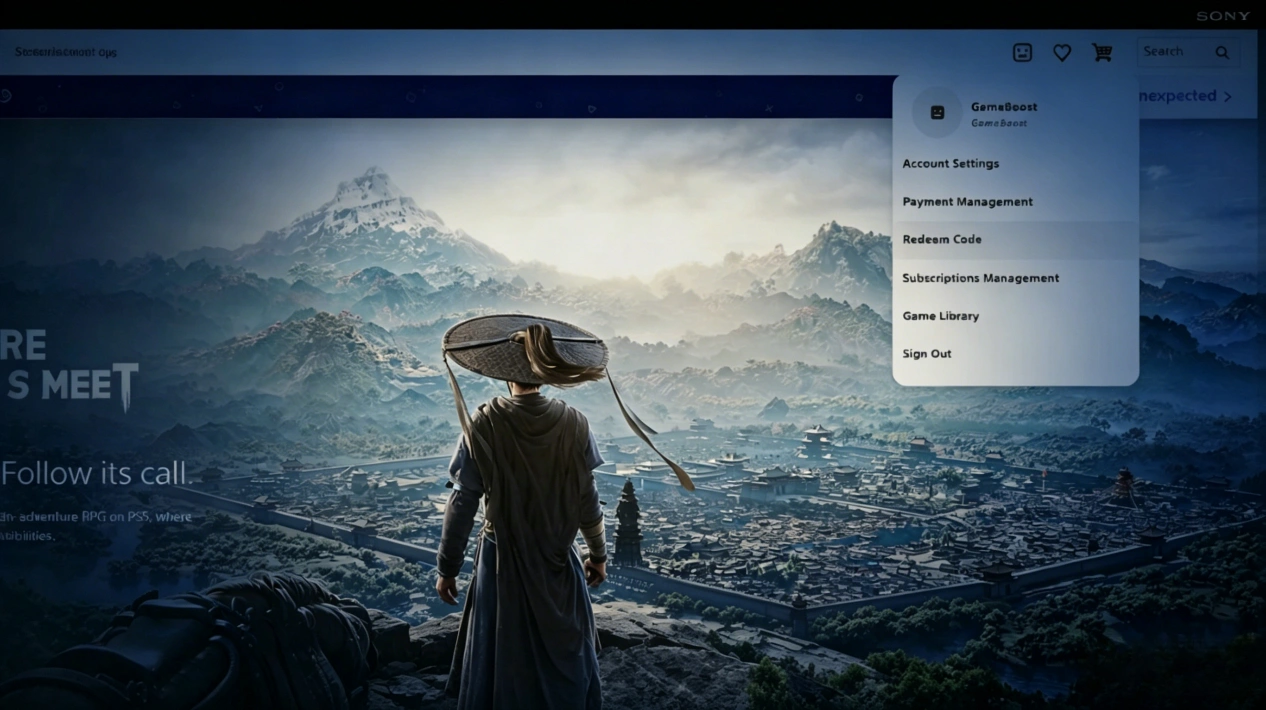
2. From the dropdown menu, select 'Redeem Codes.'
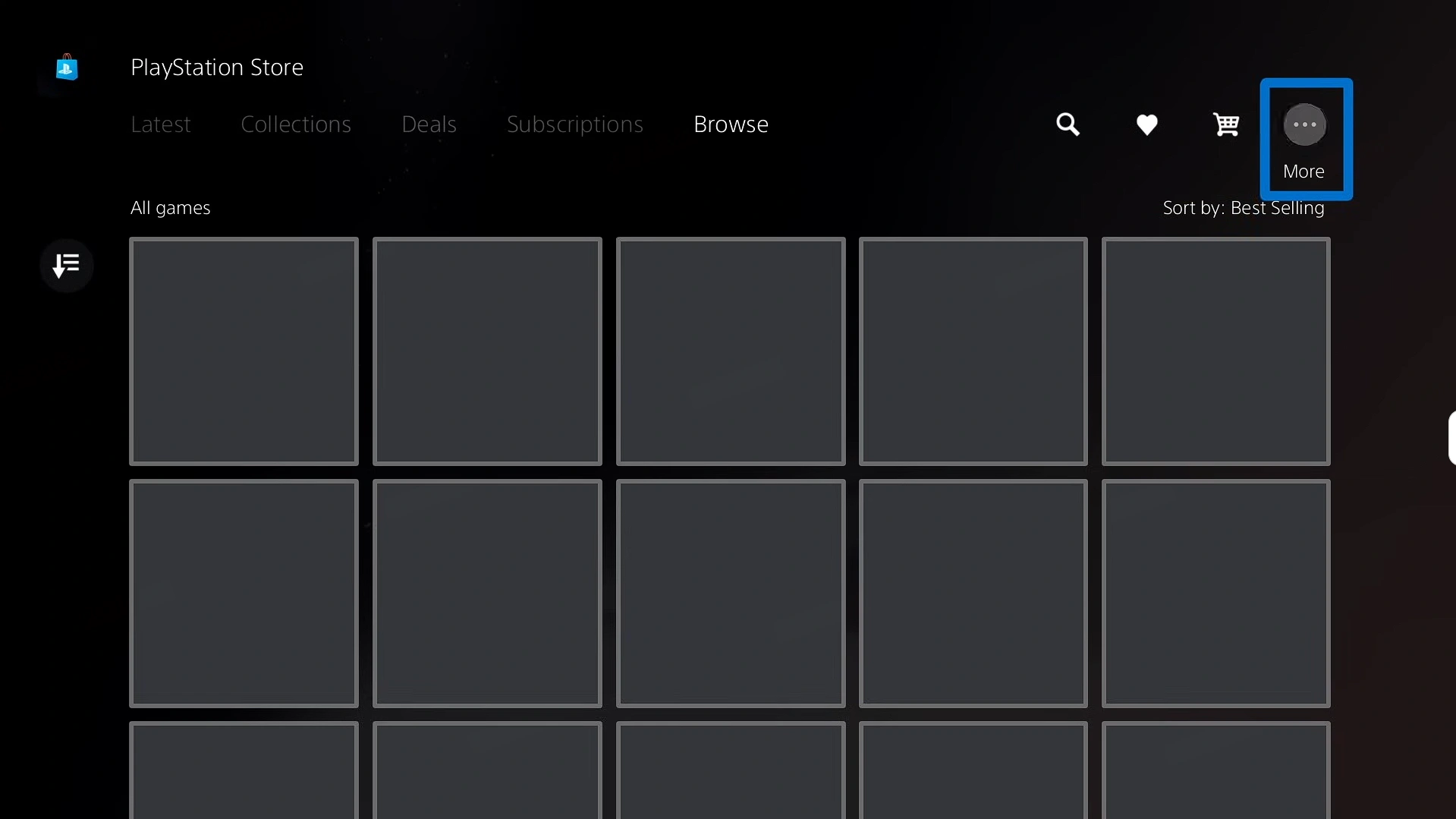
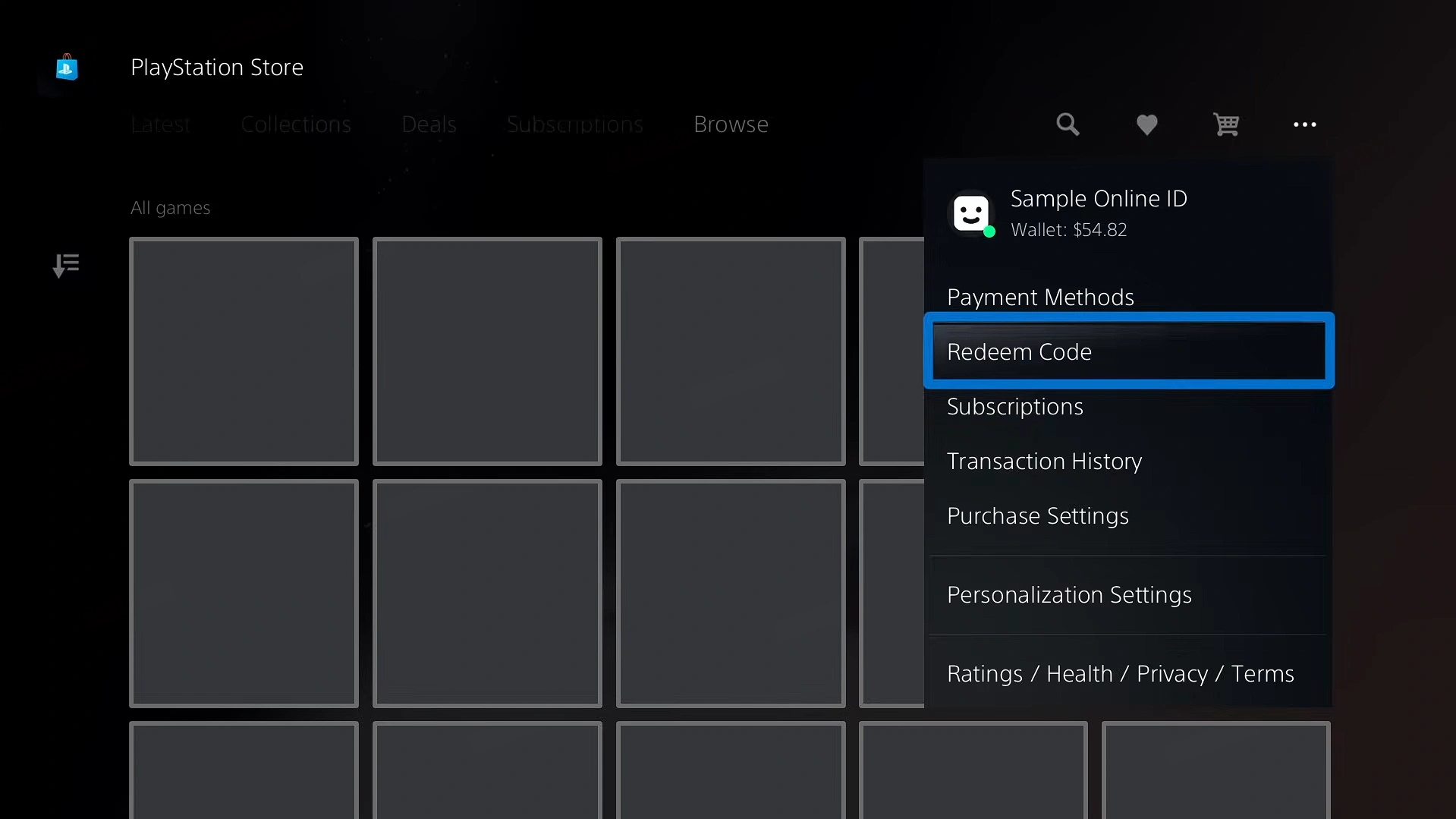
3. Enter the 12-digit code and select 'Continue.' The top-up or content will now be credited to your account wallet.
On PC
1. Log in to your account on the PlayStation Store
2. Click on the account to pop up a menu, find 'Redeem Code', and click to enter the redemption
What Is a PlayStation Gift Card?
A PlayStation Gift Card is a prepaid digital card that adds funds to your PSN wallet, allowing you to purchase games, DLC, add-ons, in-game content, and PlayStation Plus subscriptions from the PlayStation Store. Choose your preferred amount, redeem the code on your PlayStation account, and enjoy a convenient way to access digital entertainment.
What Are PlayStation Store Wallet Funds from a PlayStation Gift Card?
When you redeem a PlayStation Gift Card, it turns into PSN wallet funds — basically, your all‑purpose balance for the PlayStation Store. Use it to cop full games, DLC, bonus content, PlayStation Plus memberships, and in‑game currency packs. As a flexible prepaid setup, it works like premium store credit: unlock content instantly, keep your budget under control, and send gifts without ever sharing bank details. Whether you’re chasing fresh releases, monthly sub perks, or extra in‑game currency for your main titles, one code has you covered.
Why Buying a PlayStation Gift Card Is Necessary?
PlayStation Gift Cards are prepaid codes you use to top up your PSN wallet for PlayStation Store purchases. They’re clutch because they give you a flexible, safer way to spend — no bank card needed. You can still snag full games, memberships, extra content, and in‑game currency packs while keeping your budget in check.
- Buy full games, DLC, season passes, and in‑game currency packs
- Use PSN wallet funds to pay for subs like PlayStation Plus
- Stack savings during PlayStation Store promos and easily spend your gift balance
How to Get a PlayStation Gift Card?
You can get PlayStation Gift Cards in a few different ways:
- PlayStation Stars Points: Run through PlayStation Stars campaigns to rack up points, then swap them for PSN wallet credit you can use on games, subs, and add‑ons.
- Official Promotions and Giveaways: Follow official PlayStation accounts and trusted retailer events for chances to score PlayStation Gift Cards or PSN credit codes.
- Loyalty and Cashback Rewards: Turn eligible loyalty points or cashback from solid bank, card, or retailer programs into PlayStation Gift Cards where it’s supported.
There are free ways to earn cards, but paid options are still the fastest and most reliable way to build up serious PlayStation credit. For a smooth, no‑drama experience, LootBar is a go‑to — easy checkout, exclusive deals, and secure payments. The official PlayStation Store is also a solid backup.
Why LootBar Is Right for You
LootBar is a global platform for game top‑ups and gift cards, built for gamers who want safe payments and wide game coverage. We cooperate with top merchants in the industry on nearly 100 games in multiple languages.Our site offers games such as Steam Gift Card(MY&US), PUBG G‑Coin, and iTunes Gift Card US, etc. To see everything we support, check out the LootBar Gift Card page.
On LootBar, you can expect:
1. Secure transactions: LootBar supports 60+ payment methods worldwide — PayPal, Visa, MasterCard, and more — so grabbing a PlayStation Gift Card is quick and flexible. Every transaction is protected with bank‑grade encryption, PCI DSS‑compliant channels, and advanced anti‑fraud systems to keep things safe.
2. Instant delivery: Buy a PlayStation Gift Card on LootBar and get your code instantly. Top up fast and jump back into the game.
3. Exclusive offers: Catch exclusive promos, bonus rewards, and limited‑time discounts when you buy PlayStation Gift Cards.
4. 24/7 customer support: Our support team is online 24/7 to help with any issues or questions so your purchase and recharge experience stays smooth. Got questions about PlayStation Gift Cards? Just hit up support.
How to Buy a PSN Gift Card on LootBar?
- Head to the official LootBar website (https://lootbar.com/), choose your language and currency, and log in to your account.
- On the Home page, go to “Gift Card” and select “PlayStation Gift Card US”
- Pick the PlayStation Gift Card package and amount you want, then click “Buy Now”.
- Choose your payment method and hit “Pay Now” to finish checkout.
- Your PlayStation Gift Card code will be sent to you instantly — check your PM messages.
FAQ
Can you gift PlayStation Gift Card codes?
Yes. You can gift PlayStation Gift Card codes to others and choose the amount that best fits your needs.
Are PlayStation Gift Cards region‑locked?
Yes. A PlayStation Gift Card can only be redeemed in the same PlayStation Store region where it was purchased.
Do PlayStation Gift Cards expire?
No. PlayStation Gift Cards do not expire. Once you redeem the code and the funds are added to your PSN wallet, you can use them anytime without a time limit.
Are online gift cards safe?
Yes, as long as you purchase them from trusted platforms. Avoid suspicious websites with unrealistic discounts or unknown links from unreliable sources.
What can I buy with a PlayStation Gift Card?
You can use a PlayStation Gift Card to purchase items available on the PlayStation Store, including PlayStation Plus memberships, games, DLC, add-ons, virtual currency, pre-orders, and more.
Can I purchase and redeem the gift card without a US account?
No. You need to use a PlayStation account that matches the gift card’s region when purchasing and redeeming. For example, a US PlayStation Gift Card requires a US PlayStation account.
User Reviews
5.0
75 reviews
5 stars
100%
4 stars
0%
3 stars
0%
2 stars
0%
1 star
0%
All reviews
Latest
Most Helpful
eldarmordoch
Oct 19, 2026
Purchased PSN Gift Card 75$
amazing i reccomand!
Helpful
U1066504297
Oct 17, 2026
Purchased PSN Gift Card 25$
Fast transactions good service thank you
Helpful
U1071156051
Oct 17, 2026
Purchased PSN Gift Card 75$
Extraordinary support team! Helped me when needed.
Helpful
Order Information
ProductGTA6 Pre-Order Sale
Delivery Method Auto Delivery
Quantity
Price
$89.15