
Your search history is empty


Help Center
1. Platform Operations
1.1 How do I log in?
1.2 How do I link multiple social media accounts?
1.3 How do I link an email?
1.4 How do I change my password?
1.5 How do I find my LootBar UID?
1.6 How do I contact customer service?
1.7 How do I change the language and currency?
1.8 How do I leave a review?
2. Transactions
2.1 How long does a Direct top-up take to arrive?
2.2 My top-up hasn't arrived. What should I do?
2.3 What if I entered the wrong top-up information?
2.4 The order shows a refund has been issued. Why haven't I received it?
2.5 How do I confirm whether a product supports my game region, server, platform, and version?
3. KYC
3.1 Why is KYC verification required?
3.2 Why did my KYC verification fail?
3.3 What if my KYC verification fails or I've reached the attempt limit?
4. Payments
4.1 What are the payment limits and fees?
4.2 What should I know about convenience store payments?
4.3 What should I know about cryptocurrency payments?
4.4 Payment errors and solutions
4.5 I was charged but the order failed or still shows "Pay Now". What should I do?
5. Withdrawals
5.1 How do I withdraw to a bank card?
5.2 How do I withdraw to a Payoneer e-wallet?
5.3 What is the difference between Swift and Local transfers?
5.4 Why did my withdrawal fail, and how can I resolve it?
5.5 What is the minimum withdrawal amount?
5.6 How long does a withdrawal take to arrive?
5.7 What are the withdrawal fees?
5.8 Which countries/regions support withdrawals?
Platform Operations
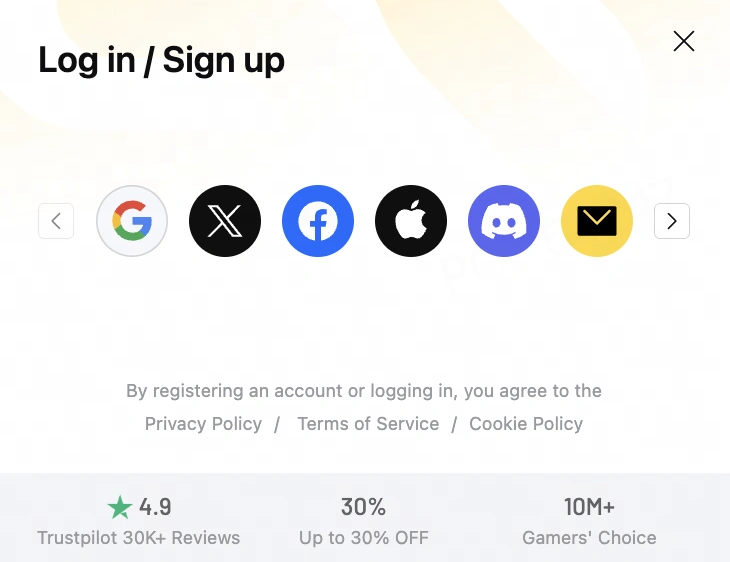
1.1 How do I log in?
- Go to LootBar.com and click "Log in / Sign up" in the top-right corner.
- You can log in with Email, Google, Twitter, Facebook, Apple, Discord, LINE, TikTok or VK. Your first login automatically registers a LootBar account for you.
1.2 How do I link multiple social media accounts?
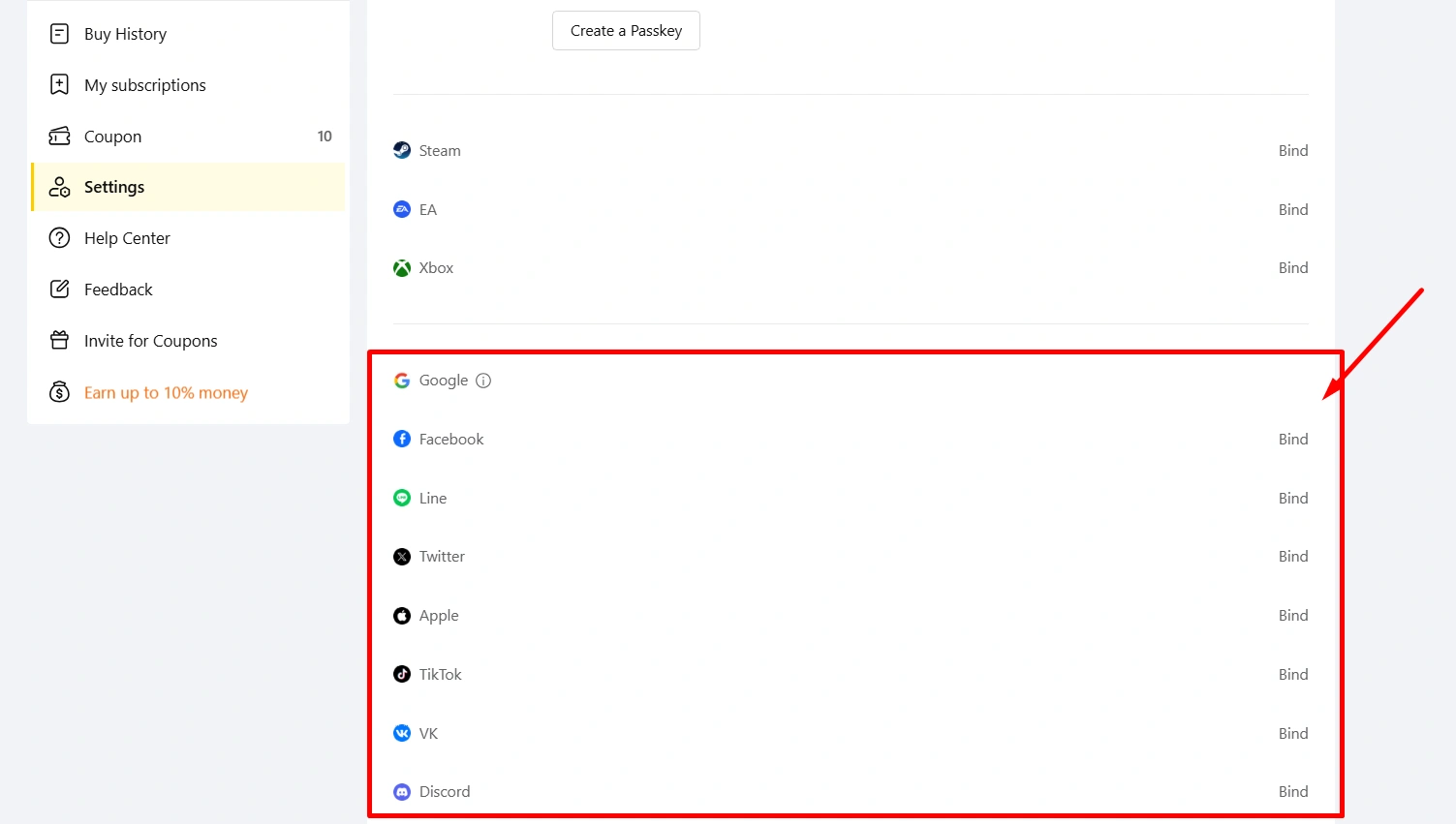
Each social media platform can only be linked to one LootBar account. To link additional social media accounts, go to "Personal Center" → "Account Information". Once linked, you can use any of them to log in. Please note that once a social media account is linked, it cannot be unlinked.
1.3 How do I link an email?
- Only accounts registered or logged in via non-email methods (such as Google, Apple, Discord, or other third-party login options) can link an additional email address. If your LootBar account is already registered with an email address, no further linking is needed.
- After logging in to LootBar, go to "Personal Center" → "Account Information" and click "Go to Link" next to "E-mail".
- Enter the email address you wish to link. To make sure verification messages can be delivered, we recommend using an email address you check regularly, then click "Send" to confirm.
- Once the verification email has been sent, please check your inbox for the verification code. If you don't receive it, check your spam/promotions folder, or wait 60 seconds and resend.
- Enter the verification code in the code field to complete the email linking.
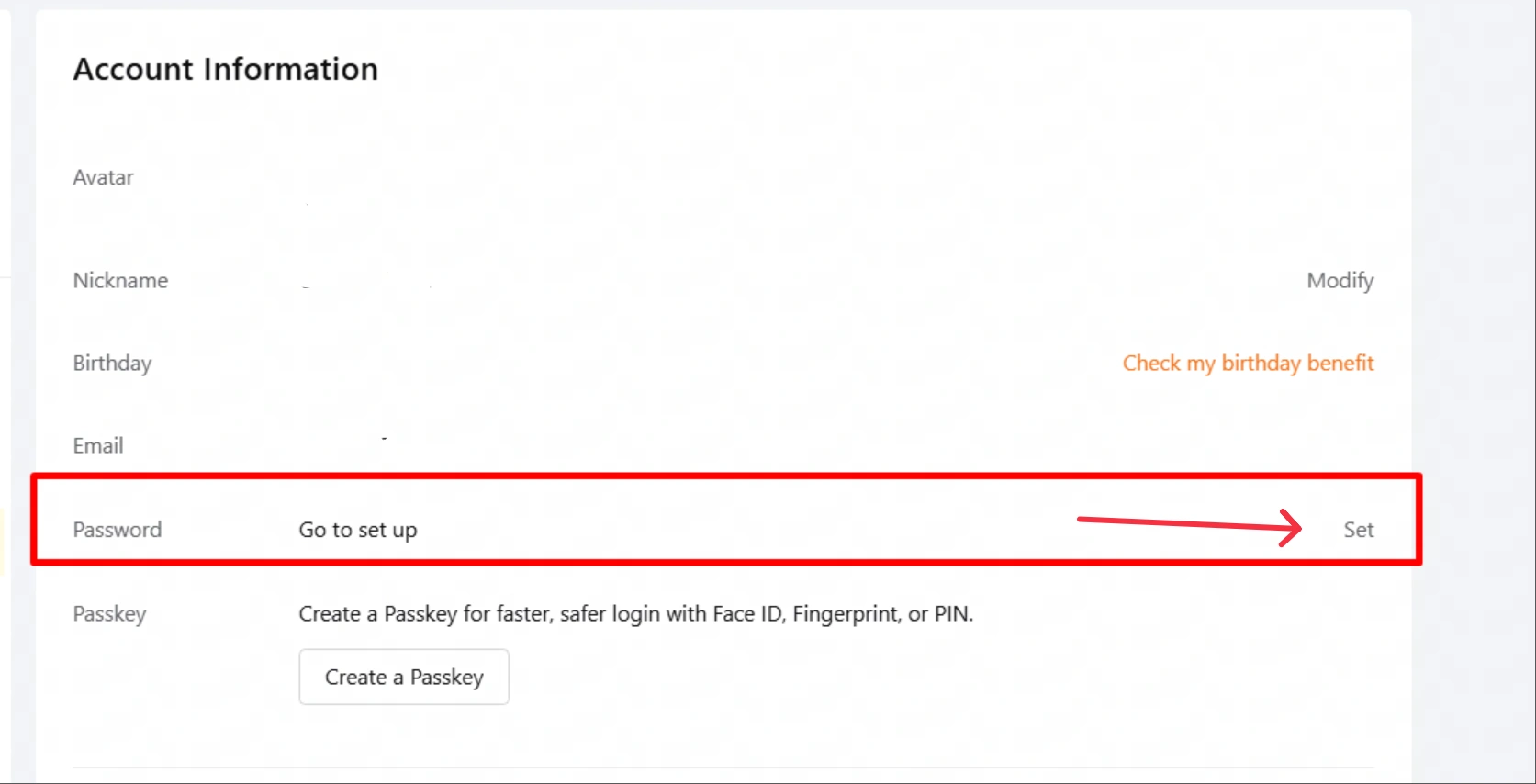
- After linking your email, you'll also need to set a login password using the "Password" function on the same page. Only after the password has been set can you log in to your LootBar account with your email and password.
1.4 How do I change my password?
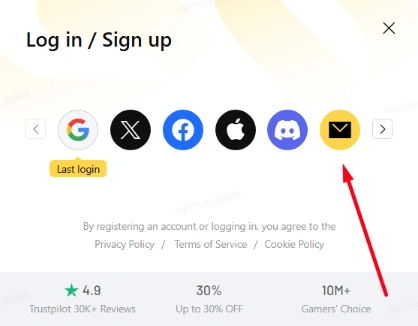
- Go to the LootBar login page and select E-mail as your login method.
- Enter the email address linked to your LootBar account and click "Continue".
- On the password entry page, click "I forgot my password".
- Follow the on-screen instructions to complete email verification and set a new login password.
- Once your new password is set, you can log in to your LootBar account with your email and new password.
If you don't receive the verification email, please check your spam/promotions folder first. If you still cannot set a new password, seek assistance via "Feedback" → "Contact Customer Service".
Note: If you log in to LootBar with a third-party account such as Google, Apple, or Discord, that account's password cannot be changed on the LootBar. To change it, please go to the corresponding third-party platform.
1.5 How do I find my LootBar UID?
- After logging in to LootBar, click your profile avatar in the upper-right corner — your LootBar UID is shown in your account information.
- You can also find it under "Personal Center" → "Account Information".
- If you have changed your LootBar nickname, the page may display the nickname you set instead of your original UID.
1.6 How do I contact customer service?
You can reach customer service in any of the following ways:
- Go to "Personal Center" → "Feedback" → "New Ticket".
- Go to "Personal Center" → "Buy History", open the order you need help with, and click "Contact Customer Service" on the order details page.
1.7 How do I change the language and currency?
Your current language and currency settings are shown in the upper-right corner of the website — click them to make changes.
You can also change the language and currency after logging in under "Personal Center" → "Preferences".
1.8 How do I leave a review?
Go to "Personal Center" → "Buy History" in the upper-right corner of the website to find your order list, open the order details page, and click "Post a Review" to share your experience. Please note that reviews can only be left for orders placed within the last 7 days.
Transactions
2.1 How long does a Direct top-up take to arrive?
Direct top-ups usually arrive within 10 minutes of successful payment. The estimated delivery time for each game is shown on its product details page. If your top-up hasn't arrived after the time indicated on the page, feel free to contact customer service at any time and we'll follow up right away.
2.2 My top-up hasn't arrived. What should I do?
If your order shows as successful but nothing has arrived in-game, try restarting the game first. If it still hasn't arrived, please contact customer service for after-sales support. Once we verify that the top-up was not delivered, a full refund will be processed. Your purchase is fully protected.
2.3 What if I entered the wrong top-up information?
Please double-check your game ID, server, and other details before placing your direct top-up order. If a purchase is made in error due to incorrect information you entered, and the top-up has already been completed, LootBar will be unable to cancel the order or process a refund. We appreciate your understanding.
Please note:
- If the game ID or server information you entered is incorrect and the top-up cannot be completed, the system will automatically issue a refund.
- If the game ID or server information you entered corresponds to an existing account, LootBar will complete the top-up base on that information. Once the order is completed, it cannot be refunded.
2.4 The order shows a refund has been issued. Why haven't I received it?
Refunds are credited to your LootBar wallet balance by default. Please check your balance under "Personal Center" → "Balance". The balance can be used directly for future orders, and paying with your balance is fee-free — making it easy to keep shopping.
If you have questions about the refund amount, or would prefer to have the funds returned to your original payment method, please contact customer service.
Refund-to-original-payment-method notes:
- Your bank or payment provider may charge a handling fee under its own rules — this fee is not collected by LootBar.
- Refund arrival times depend on the processing speed of your bank or payment provider and are expected to take 3–10 business days.
2.5 How do I confirm whether a product supports my game region, server, platform, and version?
Before purchasing, open the product details page for your game and carefully review the supported regions/servers, platforms, versions, and any other restrictions listed. Please confirm the item matches your actual situation before placing an order, to avoid being unable to use it after payment due to mismatched information.
KYC
3.1 Why is KYC verification required?
The KYC identity verification on LootBar.com is a payment verification used to confirm the user's identity.
KYC verification is designed around the Payment Card Industry Data Security Standard (PCI) and the anti-money-laundering requirements of the Financial Action Task Force (FATF), and is triggered when a user's payments/withdrawals meet specified thresholds. Its core purpose is to protect the user's card security and prevent money laundering through third-party top-up agents.
KYC verification requires a document that can verify your identity — please have a valid ID card, health insurance card, driver's license, student ID, or similar document ready.
Please rest assured that we will protect your personal information strictly. LootBar.com will not share, disclose, or sell any personally identifiable information collected online on LootBar.com (such as your name, address, phone number, or email address) to unrelated companies or organizations for non-marketing purposes.
3.2 Why did my KYC verification fail?
KYC is a real-name verification mechanism. To protect users' personal assets, LootBar requires KYC verification for top-ups, withdrawals, and other activities.
If your KYC verification fails, possible reasons include:
- The document you submitted was newly issued and its information has not yet been synchronized with the corresponding authority's records.
- Your document information is incomplete or invalid.
- Your identity verification failed.
3.3 What if my KYC verification fails or I've reached the attempt limit?
We apologize for any inconvenience caused by the real-name verification process. You can submit your information for manual review by following the steps below.
- Click "Feedback" → "Contact Customer Service".
- Select KYC verification as the feedback category.
- Provide your name, ID number, and document type (ID card or passport).
- Upload a photo of you holding the document (see the example photo).
- Upload a photo of your document together with your LootBar profile page (see the example photo — your username and avatar must be clearly visible).
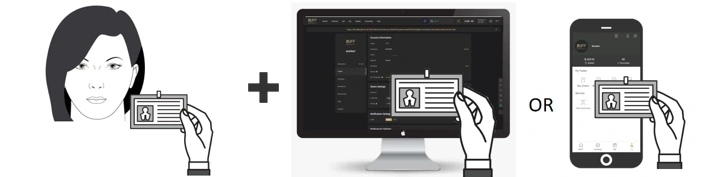
The above information is required for the KYC verification process and will be used for security verification only. LootBar is committed to strictly protecting your personal information. Manual verification takes about 1 business day to complete.
Payments
4.1 What are the payment limits and fees?
Payment limits: Due to risk-control and compliance requirements, you may encounter payment limits when spending on LootBar. LootBar adjusts these based on its policies; please refer to the information displayed on the top-up or purchase page.
Payment fees: The banking system charges a handling fee. For example, the current channel fee for Visa/Mastercard top-ups is 3.5%–4% + USD 0.15, applicable in most countries that support Visa/Mastercard. Fees may vary by payment method and country/region — please refer to the information displayed on the page.
4.2 What should I know about convenience store payments?
LootBar currently supports payments at convenience stores such as FamilyMart and Lawson. After entering your top-up details, simply complete the payment at the corresponding store.
Please note:
- Initiating a top-up does not mean you have entered the purchase process. Top-up funds go to your personal balance only; once the top-up is complete, you'll need to start the purchase again. Please be aware that during this time, the item you want may be purchased by someone else.
- Due to international payment processing, convenience store payments generally take about 3 hours to be credited. Please wait patiently. If your payment hasn't been credited after a long time, please contact customer service for further assistance.
4.3 What should I know about cryptocurrency payments?
We accept cryptocurrencies such as BTC, ETH, and USDT. You can go to the checkout and select cryptocurrency as your payment method (see image).

Please note the following when using cryptocurrency:
- Make sure the "payment network and currency" you use matches your selection — sending on the wrong network or in the wrong currency may result in loss of funds.
- Both cryptocurrency payments and refunds may incur network fees, usually due to the irreversibility of blockchain transactions and the complexity of cross-chain operations — these fees are not collected by LootBar.
- Cryptocurrency refunds to the original payment method: unlike bank refunds, once LootBar receives your refund request and initiates the original-route refund, you will receive a refund email and must follow its instructions to claim the refunded funds. Please note that network fees (gas fees) may apply to original-route refunds.
4.4 Payment errors and solutions
If your order fails, please carefully check the reason for the failed top-up. The specific errors and solutions are as follows.
-
Single payment amount too high
If your order shows errors such as "Do Not Honor" or "Suspected Fraud", a large payment amount may have triggered a security alert. You can try again with each payment kept below USD 100.
-
Other bank-side rejections
If your credit card payment fails, it was most likely rejected by your bank rather than by LootBar. Possible reasons:
- Insufficient funds in your bank account
- Your card has restricted access
For details on why your payment was declined, please contact your bank or credit card company directly.
LootBar may also have declined your top-up for the following reasons:
- You attempted to bind the same credit card to multiple different LootBar accounts.
- You have reached our payment limit.
If a payment fails, LootBar does not charge any fees. You can try paying again using the following methods:
- Use a different bank card
- Use a different browser or device
- Make several smaller purchases
- Enable your browser's blocking alerts
If you have questions about the payment result, click "Contact Customer Service" to reach us.
4.5 I was charged but the order failed or still shows "Pay Now". What should I do?
-
Bank card charged, but the order shows failed
If the order shows as failed, it means LootBar did not receive the payment. Please rest assured — LootBar does not charge for unsuccessful orders.
The charge shown on your account is usually a temporary hold (pre-authorization) by your bank or payment provider, not an actual payment to LootBar. It is generally released automatically within 3–7 business days. If it hasn't been returned after 7 business days, please contact customer service and we'll help you check.
-
Payment succeeded, but the order still shows "Pay Now"
This may be due to a synchronization delay between the payment channel and LootBar. Please wait and refresh the order status — do not pay again.
If it still hasn't updated after 3–7 business days, or the order status remains abnormal, please contact customer service with your order number.
Withdrawals
5.1 How do I withdraw to a bank card?
On the withdrawal page, you can choose to withdraw to a bank account. LootBar supports withdrawals via Airwallex and Payoneer: the minimum for Airwallex is USD 50, and the minimum for Payoneer bank card withdrawals is USD 12–35 — please refer to the withdrawal page for details. Please note that both incur currency exchange fees, which are charged by the withdrawal channel and unrelated to LootBar.
In most cases, your withdrawal will be approved within 1 day, with the transfer arriving in your account within 1–5 business days after that, depending on your bank. If your withdrawal fails, check the failure reason returned by the system on the withdrawal page, resolve it, and try again.
Due to stricter review rules for Japan, please note the following when completing the form for Japan:
- Per payment-channel requirements, please enter your "First name" and "Last name" in English;
- Please provide a detailed address down to the town, street, and house number. A format such as "street name + number" is recommended for the "Street address". If your street address contains only numbers, we recommend a format similar to "** chome 1-2-1203" to avoid rejection for non-compliance;
- For Local withdrawals, enter the "Account name" in katakana or English; for Swift withdrawals, enter it in English;
- The "Account name" must match the "First name" and "Last name" and be the cardholder's real name. Language priority: English letters > katakana. After you submit a withdrawal, LootBar and channel will review it. Once your withdrawal status shows "Approved", the transfer takes 1–5 business days to reach your account.
Please note that balances obtained from top-ups or refunds of failed purchases cannot be withdrawn — only earnings from selling items can. If you need funds returned via the original payment method, please contact customer service. The maximum single withdrawal is USD 2,000. Withdrawals to bank cards require manual review, with a maximum of 5 per day and no more than USD 20,000 per year.
In addition, more withdrawal methods are being explored — stay tuned.
5.2 How do I withdraw to a Payoneer e-wallet?
Payoneer is an international e-wallet available to users worldwide, covering bank transfers and third-party payment methods around the globe.
You can create a Payoneer account with your bank card. Funds withdrawn to your Payoneer account can then be transferred further back to your bank card, with additional fees for that step.
To withdraw using Payoneer, please follow these steps:
- You'll need your own Payoneer account — register first if you don't have one yet.
- Verify your identity in your Payoneer account and link a bank card or third-party payment method.
- Log in to LootBar and link your Payoneer account (login required).
- Create a withdrawal and wait patiently for the funds to arrive.
5.3 What is the difference between Swift and Local transfers?
Swift and Local differ in how funds are sent:
- Swift is an international wire transfer — generally higher fees and slower arrival.
- Local is a local bank transfer: the channel provider holds an account with a local bank, and when you initiate a withdrawal, the provider converts the currency and pays out from the local bank — generally lower fees and faster arrival.
We recommend prioritizing Local transfers.
5.4 Why did my withdrawal fail, and how can I resolve it?
Every withdrawal is reviewed by both LootBar and the bank. If your withdrawal is canceled, possible reasons include:
- The bank details you entered on LootBar do not match your bank's records.
- Your bank account has restricted access.
If you have questions about the withdrawal result, click "Feedback" → "Contact Customer Service" to reach us.
5.5 What is the minimum withdrawal amount?
Bank transfer: varies by channel. The minimum for Airwallex is USD 50, and the minimum for Payoneer bank card withdrawals is USD 12–35 — please refer to the withdrawal page for details.
E-wallet: varies by channel. The minimum for Payoneer e-wallet withdrawals is USD 50; for others, please refer to the withdrawal page.
5.6 How long does a withdrawal take to arrive?
Bank transfer: varies by channel. Generally, after approval, bank transfers take 1–5 business days to arrive.
E-wallet: varies by channel. Generally, after approval, e-wallet transfers can be remitted to your wallet account within 1 business day.
5.7 What are the withdrawal fees?
Fees by payment channel:
- Payoneer e-wallet: 1% + $1, with a minimum fee of $2 per transaction — based on the actual calculated amount.
- Payoneer bank transfer: 1% + fixed fee (typically $3–$15 depending on the receiving bank; usually $3 for Local transfers and $15 for Swift transfers — a bank card supporting Local transfers is recommended).
- Airwallex bank transfer: 1% + fixed fee (typically $2.5–$8 depending on the receiving bank; usually $2.5 for Local transfers and $8 for Swift transfers — a bank card supporting Local transfers is recommended).
Please refer to the information shown on the withdrawal page.
Important notes:
- If your withdrawal involves currency conversion, the relevant bank will apply its real-time exchange rate and may charge a fee.
- The receiving bank may charge additional fees, such as handling charges — please consult your bank for details.
- Please note that if a withdrawal fails, LootBar charges nothing; all fee losses are charged by the payment channel or bank.
5.8 Which countries/regions support withdrawals?
-
The following countries/regions currently support bank-transfer withdrawals (sorted A–Z by English name):
Argentina, Australia, Austria, Bahrain, Belgium, Bosnia and Herzegovina, Brazil, Bulgaria, Cambodia, Canada, Chile, Colombia, Costa Rica, Croatia, Cyprus, the Czech Republic, Denmark, Egypt, Estonia, Finland, France, Georgia, Germany, Greece, Guatemala, Hungary, Iceland, India, Indonesia, Ireland, Israel, Italy, Japan, Kazakhstan, South Korea, Latvia, Lithuania, Luxembourg, Malaysia, Malta, Mexico, Moldova, Morocco, the Netherlands, North Macedonia, Norway, Pakistan, Panama, Peru, the Philippines, Poland, Portugal, Romania, Russia, Serbia, Singapore, Slovakia, Spain, Sweden, Switzerland, Thailand, Turkey, Ukraine, the United Arab Emirates, the United Kingdom, the United States, Uruguay, and Vietnam.
Please note: available withdrawal methods and supported regions may be adjusted according to payment channel rules — please refer to the withdrawal page.
-
Countries/regions currently supporting Payoneer withdrawals:
Generally available worldwide, subject to specific circumstances.