




Product Details
Online multiplayer, a monthly games line-up and a catalogue of hundreds of PS4 and PS5 titles — PlayStation Plus gives you all of it in one membership, with three tiers and three durations to choose from. Searching for a PlayStation Plus PSN key? LootBar tops up your PlayStation Store wallet and activates the membership directly on your PSN account, so you do not receive a redeemable code. Complete your order, follow the binding steps and get help from 24/7 support whenever you need it. After activation, your membership is live and the benefits unlock on your console right away.
| Product | PlayStation Plus membership |
| Tiers | Essential, Extra, Premium |
| Durations | 1 month, 3 months, 12 months |
| Platform | PS5, PS4 |
| Delivery | PSN wallet top-up and direct activation on your account |
| Region | United States, Germany |
| Online play | Included in every tier |
| Cloud storage | Included in every tier |
| Publisher | Sony Interactive Entertainment |
| Age rating | Not applicable; individual games carry their own ratings |

What Do You Get from LootBar?
Buy PlayStation Plus from LootBar and you will get:
- The tier and duration you select on the product page.
- An active membership on the PSN account you bind to your order. LootBar tops up your PlayStation Store wallet and completes the subscription purchase on your behalf, so there is no code to redeem.
- If the subscription purchase cannot be completed, the wallet balance remains on your account and you can buy the same membership yourself from the PlayStation Store. Follow the delivery instructions in that case.
- An existing membership is extended rather than replaced: the new period is added to whatever time you have left.
- Follow the account-binding instructions after payment. Step-by-step binding help and 24/7 support are available if you need assistance.
- LootBar currently supports United States and Germany PSN accounts for this product. Confirm your account region before checkout.
About PlayStation Plus
PlayStation Plus is Sony's membership service for PS5 and PS4, sold as a recurring subscription rather than a one-off purchase. One active membership covers online multiplayer, the monthly games line-up, member-exclusive discounts and cloud storage, and it applies to both consoles at once — there is no separate PS4 or PS5 version to pick. The three tiers differ in how many games they include, not in whether the core features work.
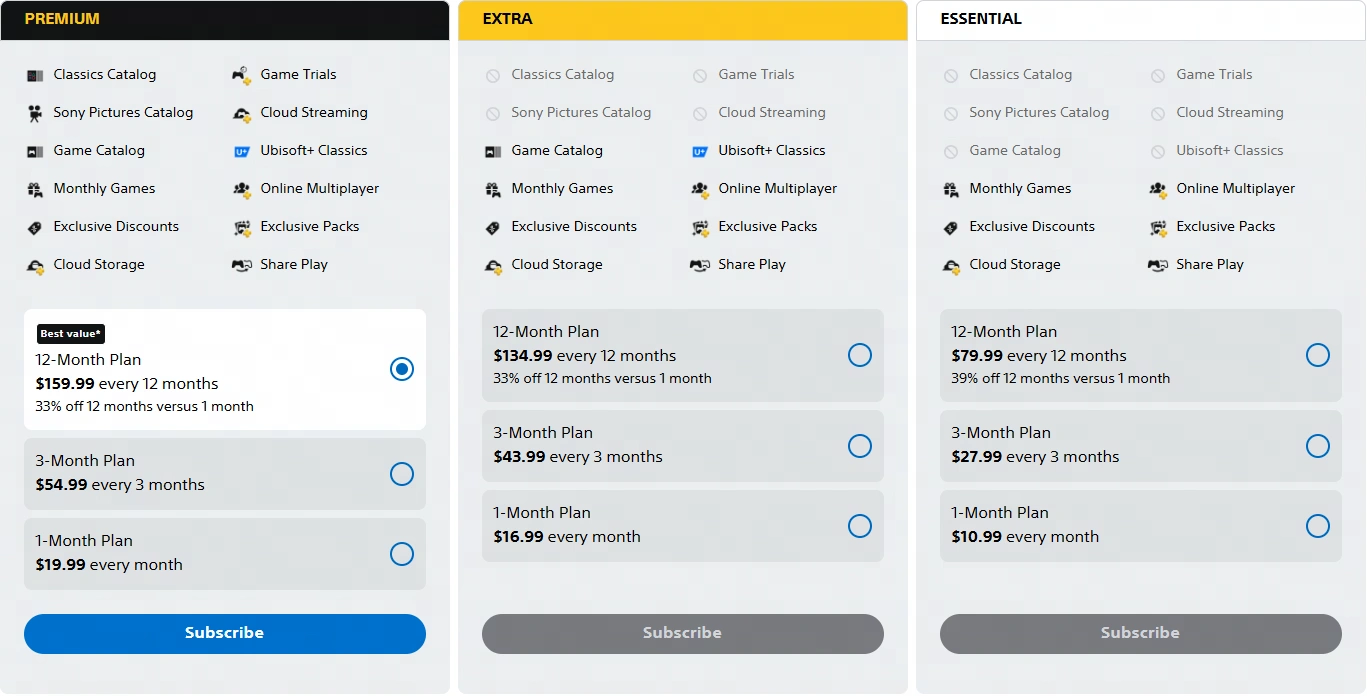
- Essential: Online multiplayer, the monthly games line-up, exclusive discounts, cloud storage for saved data, Share Play and Game Help. The entry tier, and the one to pick if online play is all you need.
- Extra: Everything in Essential plus the Game Catalog, a library of hundreds of PS4 and PS5 games to download and play, including the Ubisoft+ Classics collection.
- Premium: Everything in Extra plus the Classics Catalog of titles from older PlayStation generations, time-limited game trials, cloud streaming and the Sony Pictures Core film catalogue.
- Monthly games: Titles added each month stay in your library for as long as your membership is active, and are playable again if you resubscribe.
- Catalogue rotation: Game Catalog and Classics Catalog titles are added and removed over time, so a specific game is not guaranteed to stay available for the whole of your membership.
Auto-renewal: PlayStation Plus subscriptions bought through the PlayStation Store renew automatically at the end of each period. You can turn auto-renewal off at any time under Settings > Users and Accounts > Account > Subscriptions on your console, or in your account settings on the web.
How to Buy and Activate PlayStation Plus on LootBar?
- Select the tier and duration shown on the product page, confirm your PSN account region, then click “Buy Now”.
- Choose a payment method and complete payment.
- Bind the PSN account on which you want the membership and complete the one-time 2FA verification when prompted.
- LootBar tops up the wallet and activates the subscription on your account. Check Settings > Users and Accounts > Account > Subscriptions on your PS5 to confirm the new expiry date.