




Lootbar Official Store
Instant Activation via LootBar
Product Details
Sirens wail, smoke thickens, and the city's counting on you-kick in doors, vent rooftops, and orchestrate rescues with your squad. Firefighting Simulator - The Squad lets you feel the heat up close as part of a major US firefighting crew, solo or with up to three friends in co-op. Secure your Firefighting Simulator - The Squad Steam key for PC and dive into authentic tools, dynamic missions, and tight teamwork. Snag a Firefighting Simulator - The Squad CD key at the Best Deal, enjoy Quick Delivery, and get playing fast. Our 24/7 Support and Money-back Guarantee have your back-grab your Firefighting Simulator - The Squad key and suit up.
Firefighting Simulator - The Squad Steam Key Details
| Game | Firefighting Simulator - The Squad |
| Platform | Steam |
| Supported Devices | PC |
| Key Type | 15 or 25 character digital activation code |
| Delivery Time | Instant delivery |
| Activation Method | 1. Instant activation on LootBar 2. Redeem manually on Steam Store |
Please note that CDKeys for pre-ordered games will only be delivered after the official release date.
About the Firefighting Simulator - The Squad
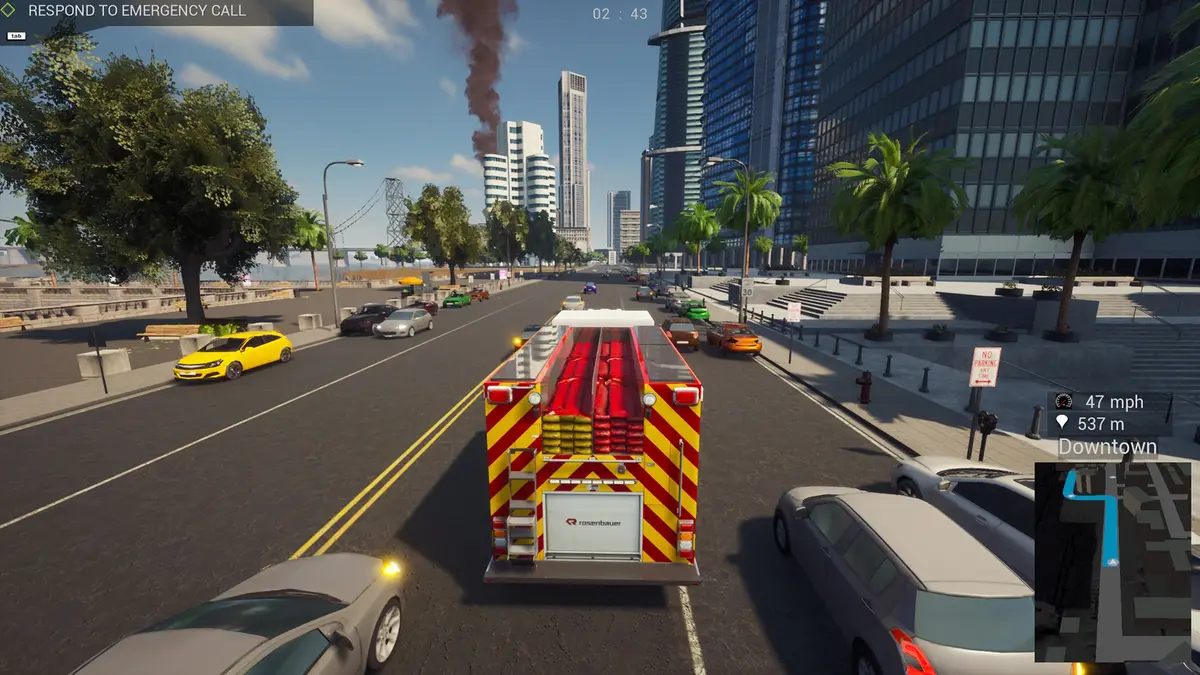
Firefighting Simulator - The Squad is a first-person and third-person simulation set in a major US city inspired by the North American West Coast. You join an active municipal crew, suit up with authentic gear, and answer alarms with a focus on disciplined, real-time operations where every minute matters.
Drive faithfully reproduced Rosenbauer America trucks to incidents across more than 40 deployment locations in a 15,000-acre townscape. With up to three friends or AI teammates, you secure scenes, rescue civilians, and suppress fires using appropriate tools and coordinated tactics, shifting from the wheel to the hose as situations evolve.
Your choices shape the outcome. Route planning, task assignments, and on-site priorities influence response times, victim safety, and damage control. The core appeal is a grounded squad experience that values clear roles, calm communication, and the steady rhythm of professional firefighting under pressure.
Learn more about Chronos Unterhaltungssoftware and follow the latest updates on Steam.
Firefighting Simulator - The Squad Review
Firefighting Simulator - The Squad has had time to prove itself. Post-launch patches and word of mouth nudged it from niche curiosity to a dependable co-op staple, with a steady, respectable consensus on Metacritic and OpenCritic. What endures is the grounded feel of hose handling, ventilation, and room clearing, plus a variety of callouts that reward communication and role discipline.
Today it holds up: performance and stability are markedly better, controller support and co-op matchmaking feel smoother, and updates have added new callouts and quality‑of‑life tweaks. The community remains active, so squads are easy to find, and it's become a trusted pick for relaxed-but-authentic session play. If you enjoyed the methodical teamwork of Ready or Not or the slow-burn, gear-driven problem‑solving of SnowRunner, you can't afford to leave this one off your backlog.
Why Buy Firefighting Simulator - The Squad Steam Key on LootBar?
- Exclusive Discounts. Compared with other CDKey stores, LootBar delivers unbeatable deals on your Firefighting Simulator - The Squad Steam key purchase.
- 100% Secure Checkout. Buy with confidence: LootBar supports 60+ globally recognized payment methods, including your preferred local options, and uses industry-leading encryption to keep your payments secure.
- Instant Delivery. With LootBar, purchasing and activating CD keys is seamless, delivering your code instantly so you can jump into the action in minutes.
- Activation Success Guaranteed. We guarantee your Firefighting Simulator - The Squad Steam key is 100% genuine, and we fully back its successful activation; if you encounter any issues, we will issue a full refund.
- 24/7 Responsive Support. "Reputation First! Customers Foremost!" is our guiding mantra, and whenever you need assistance, LootBar's dedicated support squad is on call 24/7 to help.
How to Buy and Activate Firefighting Simulator - The Squad Steam key on LootBar?
- Head to LootBar and log in. No account? Register first.
- Top menu first: Click "Game keys" and find "Firefighting Simulator - The Squad" or search for it directly.
- Pick your preferred edition, then click "Buy Now".
- Choose a payment method, and complete payment.
- Enter the required details, then wait for delivery.
- After received the digital key, redeem it directly using LootBar Instant Activate or redeem it in the Steam store.

System Requirements
User Reviews





FAQ
What do I receive after purchase?
If you choose to use our free Lootbar Instant Activation, you will receive the game directly in your account upon success, making it much faster and more convenient. If you do not use this service, you will receive a standard digital Steam code for Firefighting Simulator - The Squad in your order details. Please note: This is a digital product, and no physical item will be shipped.
Do I need a platform account before activation?
Yes. You need a valid account for the corresponding platform in order to redeem and use this code. Please make sure you are signed in to the correct account before activation, as redeemed codes usually cannot be transferred to another account.
Are there any region or account restrictions before activation?
Please carefully review the region information displayed on the first screen before purchase. Some Steam keys can only be redeemed in specific countries or regions, and in some cases your account settings may also affect redemption. To avoid issues, make sure your account and redemption region meet the Firefighting Simulator - The Squad Steam key requirements before activating the code.
However, if you're facing a region mismatch but still want the deal, we've got you covered! Use Lootbar Instant Activation, the system will automatically attempt to activate the code on your behalf. If successful, your order is completed normally; if the activation fails, your order will be automatically cancelled, and you will receive a full refund. Zero risk attached!
What should I do if the Firefighting Simulator - The Squad Steam key does not work?
Please first confirm that you are entering the Firefighting Simulator - The Squad Steam key correctly and redeeming it on the correct Steam account in an eligible region. If the problem continues, contact customer support with your order number and any error message or screenshot so the issue can be checked.
Is the Firefighting Simulator - The Squad Steam key on LootBar officially authorized?
Yes, absolutely! We source all Firefighting Simulator - The Squad Steam keys directly from authorized distributors to ensure you receive a fully legitimate activation code. Shopping on LootBar means you not only get instant digital delivery, but also secure global payment options and 24/7 support. Plus, our full buyer protection guarantees a smooth experience—including a refund if your key ever fails to activate.
Can I get a refund for my Firefighting Simulator - The Squad Steam key?
An unused, un-redeemed Firefighting Simulator - The Squad Steam key can be refunded under our policy. Once your purchased Steam key has been activated on Steam Store, it can't be returned, since it's tied to your account.
How long does it take to receive my Firefighting Simulator - The Squad CD Key after purchase?
Our system delivers automatically 24/7. After a successful payment, the Firefighting Simulator - The Squad CDKey is usually sent to your order details page immediately.
Where can I find my purchased code after payment?
After your payment is completed and the order is processed, you can find your code in your account center. Log in to our website at any time, go to "Account - Buy History," and then directly view your activation code.
What should I know before buy Firefighting Simulator - The Squad Steam key?
1. Confirm that this product matches your preferred platform.
2. Confirm whether the game activation code is valid in your region.
3. Ensure you have an active Steam Account ready for code redemption.
4. Ensure your system meets the game's requirements and has sufficient storage space.
Lootbar Official Store