
Your search history is empty


Puzzles & Survival Top Up
5.0
282
19.4k Sold
Fast
Safe
24/7
- 14
- 22
- 43
Invite Friends and Get 3*8% OFF Discount
- Any 0.99 Pack$0.85-$0.14$0.99
- Any 4.99 Pack$4.24-$0.75$4.99
- Any 9.99 Pack$8.47-$1.52$9.99
- Any 19.99 Pack$16.93-$3.06$19.99
- Any 49.99 Pack$42.32-$7.67$49.99
- Any 99.99 Pack$84.64-$15.35$99.99
- 99 Vouchers$0.85-$0.14$0.99
- 499 Vouchers$4.24-$0.75$4.99
- 999 Vouchers$8.47-$1.52$9.99
- 1499 Vouchers$12.70-$2.29$14.99
- 1999 Vouchers$16.93-$3.06$19.99
- 2499 Vouchers$21.16-$3.83$24.99
- 2999 Vouchers$25.40-$4.59$29.99
- 3999 Vouchers$33.86-$6.13$39.99
- 4999 Vouchers$42.32-$7.67$49.99
- 9999 Vouchers$84.64-$15.35$99.99
- Any 499.99 Pack$450.00-$49.99$499.99
- Any 999.99 Pack$910.00-$89.99$999.99
Can’t find the pack you’re looking for?
Top-up instructions
Puzzles & Survival Top-up Guidance
LootBar currently provides Self-TopUp for Puzzles & Survival, allowing you to complete the recharge through LootBar’s self-service interface after purchasing your pack.
For a smoother Puzzles & Survival top up experience, we recommend using Google or Facebook to log in if your game account is already linked to either service.
Applicable Platforms for PNS Top-up
Puzzles & Survival Mobile Version
Applicable Servers for Puzzles & Survival Top-up
International Servers
Required Information for Puzzles & Survival Recharge
No account information needs to be submitted manually to LootBar staff. After purchasing, use LootBar Self-TopUp to log in to your Puzzles & Survival account, enter the in-game store, and redeem the eligible gift pack corresponding to your purchase.
Top-up Procedures
After purchasing your Puzzles & Survival top-up package on LootBar, follow these steps to complete the recharge:
1. Select Self-TopUp. On the Payment Completion page, choose Self-TopUp to start the recharge process.
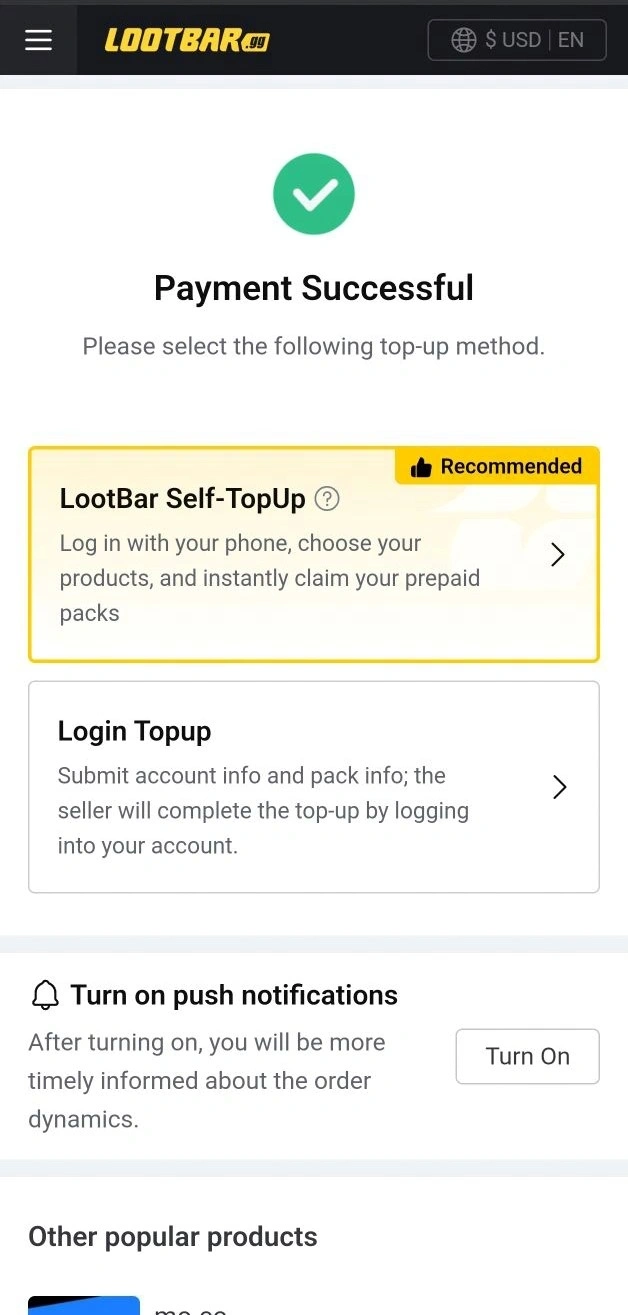
2. Log in to Puzzles & Survival. Enter the game through the Self-TopUp interface, sign in to your account, and open the in-game store.
Note: Apple accounts are currently not supported. If necessary, bind your account to Google or Facebook and use that account to log in for the recharge.
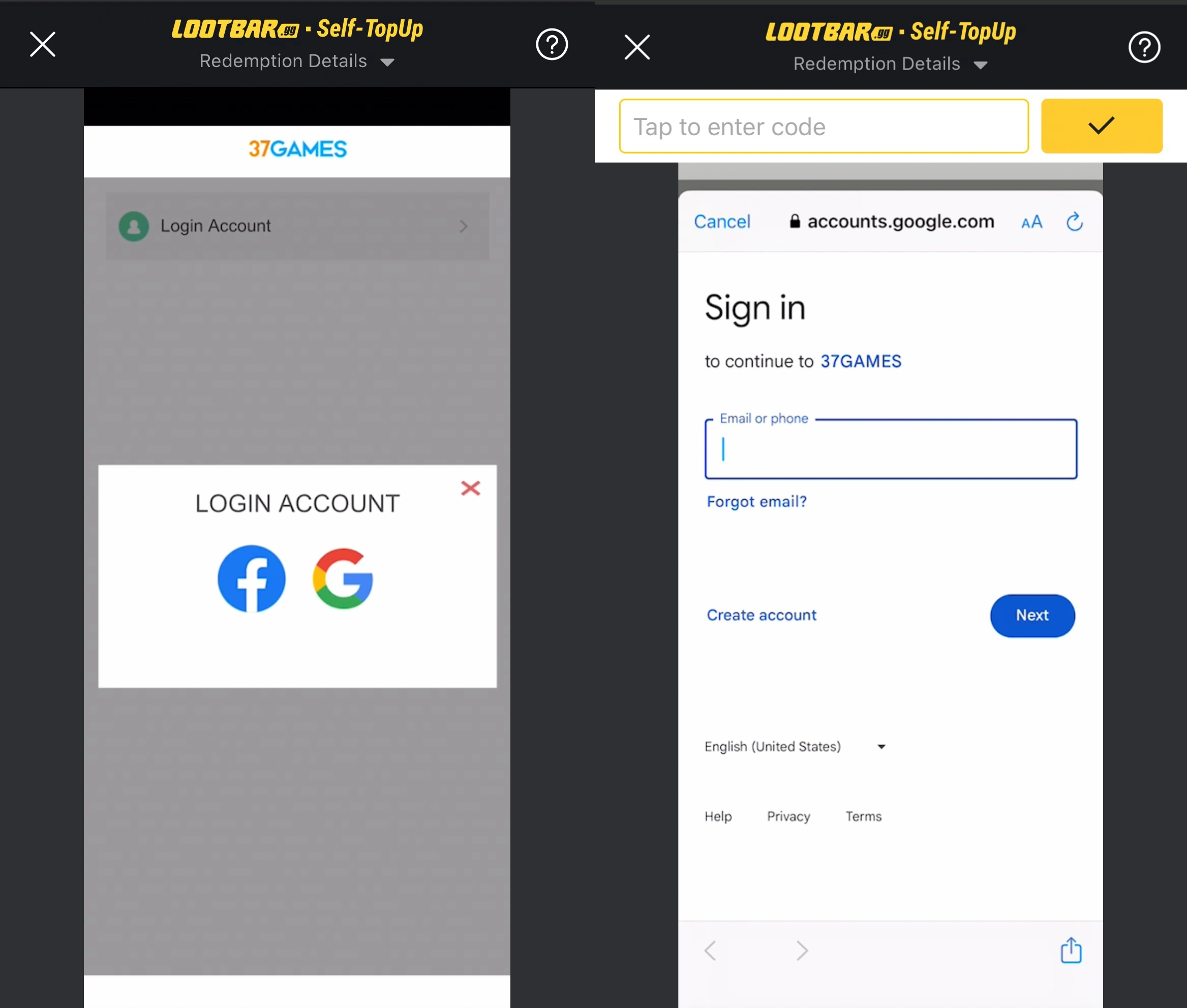
3. Find and redeem your pack. Locate an eligible in-game pack that matches the value of your LootBar purchase, confirm the package details, and claim it.
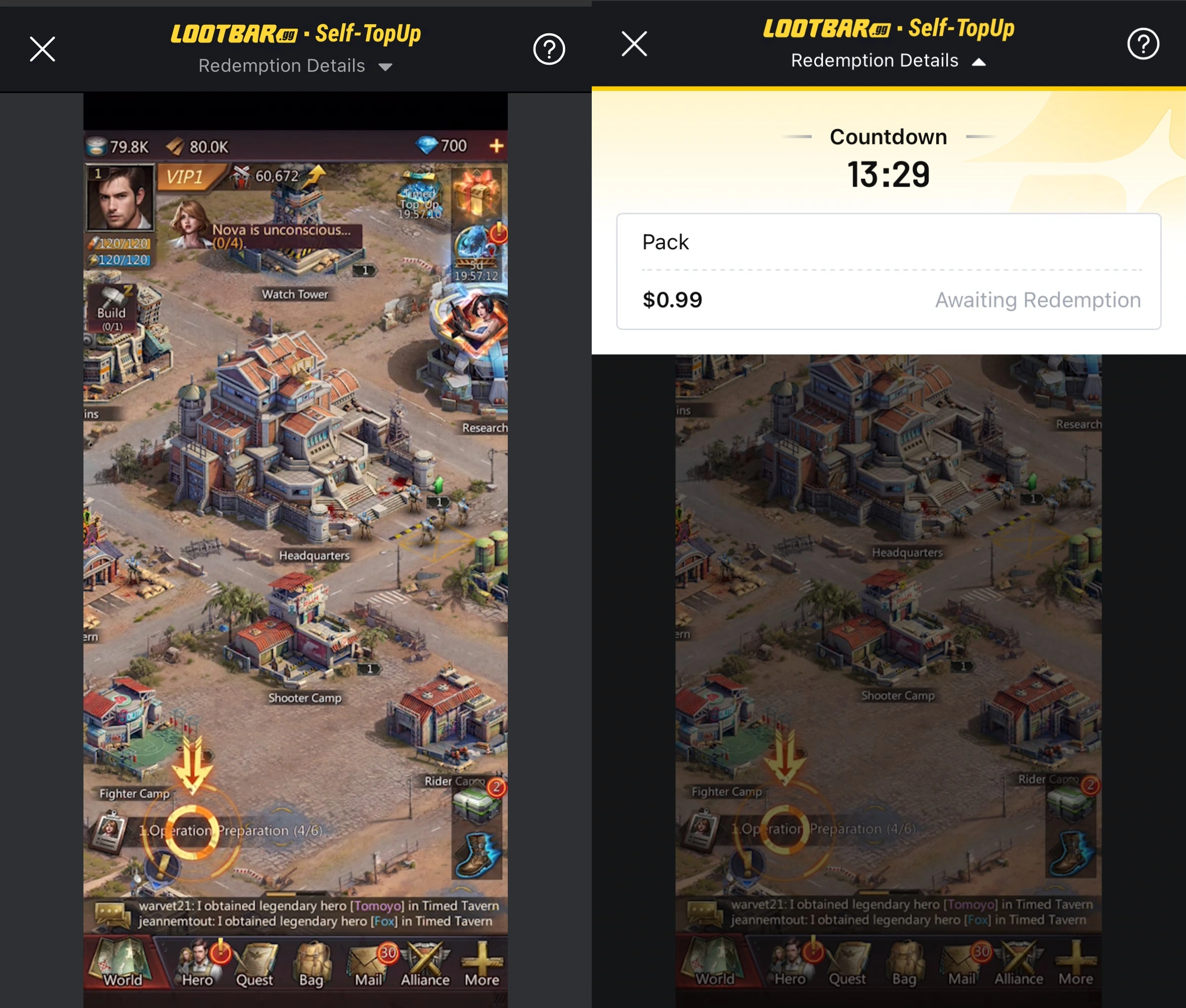
4. Wait for the recharge to complete. Keep the Self-TopUp process open until the redemption has been processed.
5. Verify your PNS top-up. Check that the purchased pack has been successfully credited to your account. Once you exit Self-TopUp, your login information will be automatically cleared.
Note:
1. Item prices in the LootBar in-game store are displayed in USD. If you normally use another currency, switch the display currency to USD to find the corresponding price. You may select any available bundle with an equivalent USD value.
2. If you encounter any issues during Self-TopUp, contact LootBar customer service with your account information for assistance.
What is Puzzles & Survival?
Puzzles & Survival is a free-to-play mobile game developed by 37GAMES that uniquely blends match-3 puzzle gameplay with 4X strategy elements, set in a post-apocalyptic world overrun by zombies. Available on both Android and iOS platforms, the game offers a multifaceted experience combining puzzle-solving, base-building, and strategic combat.
How to download Puzzles & Survival
1. Puzzles and Survival Android apk
2. Puzzles and Surviva iOS apk
How Does a Puzzles & Survival Top Up Work With Diamonds, Vouchers, and Packs?
A Puzzles & Survival top-up can give players access to different types of in-game value, mainly through Diamonds, Vouchers, and Shop Packs. Diamonds function as the game's primary premium currency and can be used for progression, resources, and selected in-game purchases. Vouchers provide another spending option through the Voucher Mall, where players can exchange them for eligible items and packs.
Shop Packs bundle resources, speed-ups, and other items into fixed offers available through the game's stores. Depending on the product you choose, a PNS top-up on LootBar can help you purchase the corresponding pack value or Voucher amount that best matches your in-game needs.
Why Top Up Puzzles & Survival on LootBar?
LootBar's Self-TopUp system gives you more control over what you redeem instead of limiting you to a single predefined package.
1. Save Across Multiple Recharge Values
LootBar currently lists discounted prices across many Puzzles & Survival packs and Voucher tiers, helping you spend less than the displayed reference value.
2. Choose Your Pack Inside the Game Store
With Self-TopUp, you can purchase a value tier first and then select an eligible bundle of the corresponding value from the in-game store.
3. Pick Between Packs and Vouchers
Your Puzzles & Survival top-up is not limited to one product type. LootBar offers both Any Packs and multiple PNS Voucher denominations.
4. Flexible Options From Small to Large Top-Ups
Recharge options range from entry-level $0.99 packs to high-value bundles, making it easier to match the purchase to your current budget or in-game goal.
5. 7-Day After-Sales Support
LootBar provides a 7-day after-sales guarantee for this product, along with 24/7 customer service if you encounter an order or recharge issue.
Explore More Survival & Strategy Games After Your Puzzles & Survival Top Up
Puzzles & Survival's blend of base-building strategy and zombie apocalypse survival resonates strongly across several top mobile titles. For players drawn to the 4X warfare and alliance-driven combat against undead hordes, grab a Last War top up or Dark War Survival shop to accelerate your progression through similarly intense post-apocalyptic campaigns where resource management and tactical decision-making determine who survives. Fans of the shooting-focused survival experience can also pick up a Last Z top-up to gear up in Last Z: Survival Shooting's action-packed zombie encounters.
The match-3 puzzle combat that makes Puzzles & Survival so addictive has a spiritual cousin in Tiles Survive — invest in a Tiles Survive shop to enhance your tile-matching journey with a fresh twist on the formula. And for those who enjoy the broader strategy layer of marshaling troops, upgrading defenses, and conquering territory, a Clash of Clans store purchase lets you fast-track village upgrades in one of the genre's most iconic titles — all available on LootBar with competitive pricing and instant delivery.
How to top up Puzzles & Survival on LootBar?
1. Enter the LootBar.com official website https://www.lootbar.com/, choose language, currency type and log in.
2. On the Home page, find "Puzzles & Survival" in the Top-Up column.
3. Determine how many Puzzles & Survival packs you want to purchase and click “Top-up Now”.
4. You will be prompted to provide your login details, including your login account and password, followed by the Puzzles & Survival top-up guidance.
5. Choose your preferred payment method and finish the payment. Click "Pay Now".
6. Once the order is confirmed, Puzzles & Survival packs will be transferred to your account after a few minutes.
FAQ
What is the difference between an Any Pack and PNS Vouchers on LootBar?
An Any Pack is purchased according to a specific USD value and lets you select an eligible package of the corresponding value during Self-TopUp. Vouchers are sold in fixed Voucher quantities such as 99, 499, 999, and higher amounts.
Can I choose which Puzzles & Survival pack I receive?
For eligible Any Pack purchases, you select the corresponding bundle yourself through the in-game store during the Self-TopUp process rather than receiving a randomly selected package.
Why does the Self-TopUp store show prices in USD?
LootBar uses USD values to match your purchased Any Pack with the corresponding in-game bundle. If your normal game currency is different, switch the store display to USD before selecting your package.
Can I use an Apple account for Puzzles & Survival Self-TopUp?
Apple account login is currently unavailable through LootBar's Self-TopUp process. LootBar recommends binding and logging in through Google or Facebook when applicable.
Does Self-TopUp keep my Puzzles & Survival login information?
LootBar states that your login information is automatically cleared after you finish the redemption process and exit Self-TopUp.
Is Puzzles & Survival available on Android?
es. Puzzles & Survival is available on Android through Google Play. Google Play currently lists the game as developed by 37GAMES and describes it as combining match-3 puzzle combat with strategy, sanctuary building, hero recruitment, and alliance gameplay.
Does Puzzles & Survival support multiplayer?
Yes. Puzzles & Survival includes multiplayer and alliance-based gameplay. Players can cooperate with allies while also competing against other players as part of its wider strategy systems.
User Reviews
5.0
282 reviews
5 stars
98%
4 stars
2%
3 stars
0%
2 stars
0%
1 star
0%
All reviews
Image
Latest
Most Helpful
U1067334661
Oct 9, 2026
Purchased Any 9.99 Pack
Top
Original Text
Helpful
U1061817716
Oct 8, 2026
Purchased 999 Vouchers
😍😍😍
Original Text
Helpful
U1061656773
Oct 7, 2026
Purchased 2499 Vouchers
Quickly!!!
Original Text
Helpful
Trustpilot
Service Guarantee
- 7-Day After-Sales GuaranteeAn extended warranty period allows for post-sales support, including refunds, in case of in-game bans or other issues related to this order within 7 days after delivery.
- Safe and Fast Top-UpWe use only formal channels for top-ups, ensuring traceable and reliable sources to guarantee your account security.
- 24/7 Customer ServiceIf you experience issues such as the top-up not being credited or an incorrect item purchased, you can reach out to our 24-hour customer service at any time, and we will assist you promptly.
Order Information
ProductAny 0.99 Pack
Quantity
Price
$0.85
Cart
0