
Your search history is empty



eFootball (PES) Top Up
5.0
852
42.4k Sold
Fast
Safe
24/7
- 14
- 23
- 30
Invite Friends and Get 3*10% OFF Discount
Only Supports iOS via KONAMI Login. Pay attention to your monthly data transfer attempts. Android users please check
How to Redeem by Self-TopUp
- Total 0/1130+130 Coins$0.98-$0.21$1.19
- Total 0/1530+310 Coins$3.92-$0.87$4.79
- 10 Draws of Player$6.60-$1.47$8.07
- 50 Coins+Starter Set: Luis Suarez$0.81-$0.18$0.99
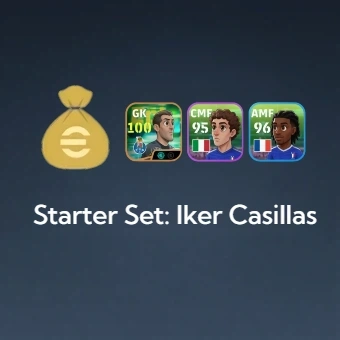
- Starter Set: Iker Casillas$2.03-$0.46$2.49
- 130 Coins$0.98-$0.21$1.19
- 300 Coins$2.20-$0.49$2.69
- 550 Coins$3.92-$0.87$4.79
- 750 Coins$5.32-$1.17$6.49
- 1040 Coins$7.20-$1.59$8.79
- 2130 Coins$14.73-$3.26$17.99
- 3250 Coins$22.10-$4.89$26.99
- 5700 Coins$36.02-$7.97$43.99
- 12800 Coins$76.96-$17.03$93.99
Can’t find the pack you’re looking for?
Top-up instructions
eFfootball Top-up Guide
Experience the smooth and fast eFfootball top-up service on LootBar. Want to recharge eFfootball for lower prices but worried about account security? Relax, you don’t have to share any account details with us!
With LootBar Self-TopUp service, you can sign in to the game yourself and redeem the corresponding items from the eFootball in-game store, in usually 5 minutes. Once completed, just exit the Self-TopUp interface, and your information will be automatically cleared.
Private, safe, easy, and fast!
Applicable Platform
eFootball Mobile(IOS Only)
Applicable Server
Global Server
Top-up Method
LootBar Self-TopUp
Required Information
You do not need to submit your game account details to customer service. Sign in yourself through the Self-TopUp interface to complete the redemption in the eFootball in-game shop.
Note: We recommend Self-TopUp for a safer, smoother, and more convenient eFootball top-up experience.
Top-up Procedures
After purchasing your eFootball top-up package on LootBar, follow the steps below to complete the recharge through Self-TopUp:
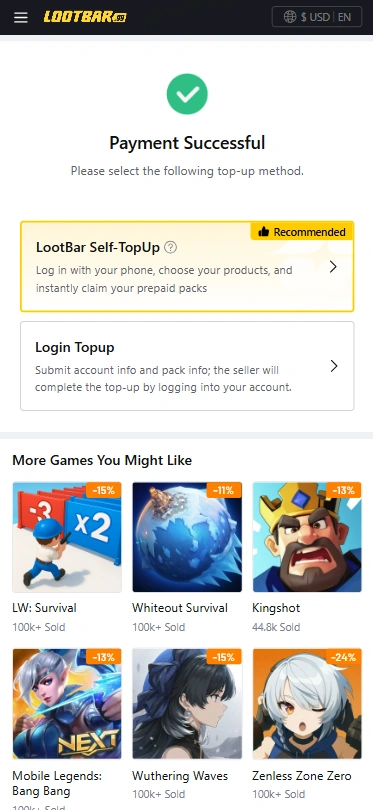
1. Select Self-TopUp: After completing your purchase on LootBar, choose LootBar Self-TopUp on the payment success page to start the recharge process.
2. Log in to eFootball. Enter the game through the Self-TopUp interface, sign in to your eFootball KONAMI account, and open the in-game store.
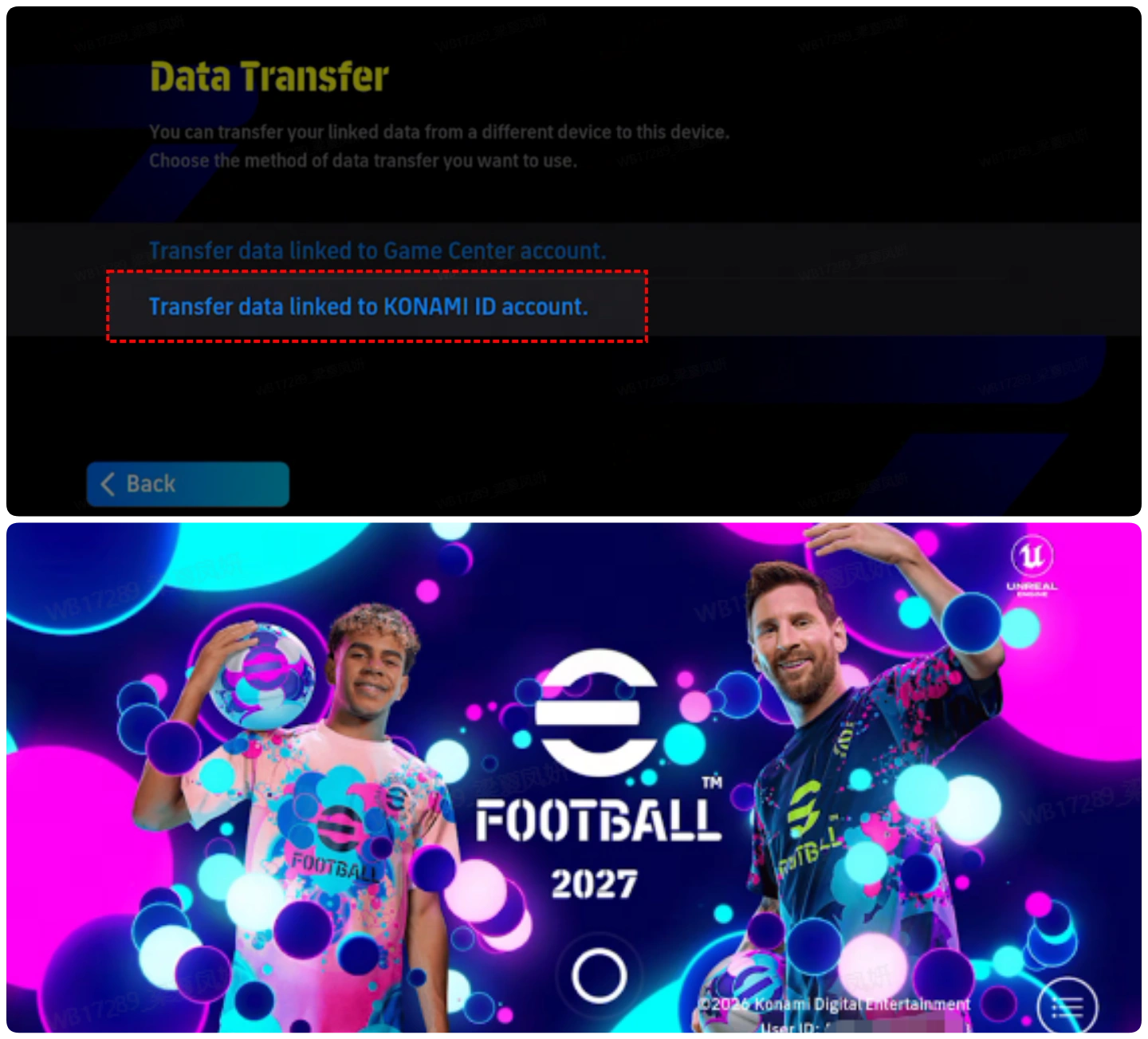
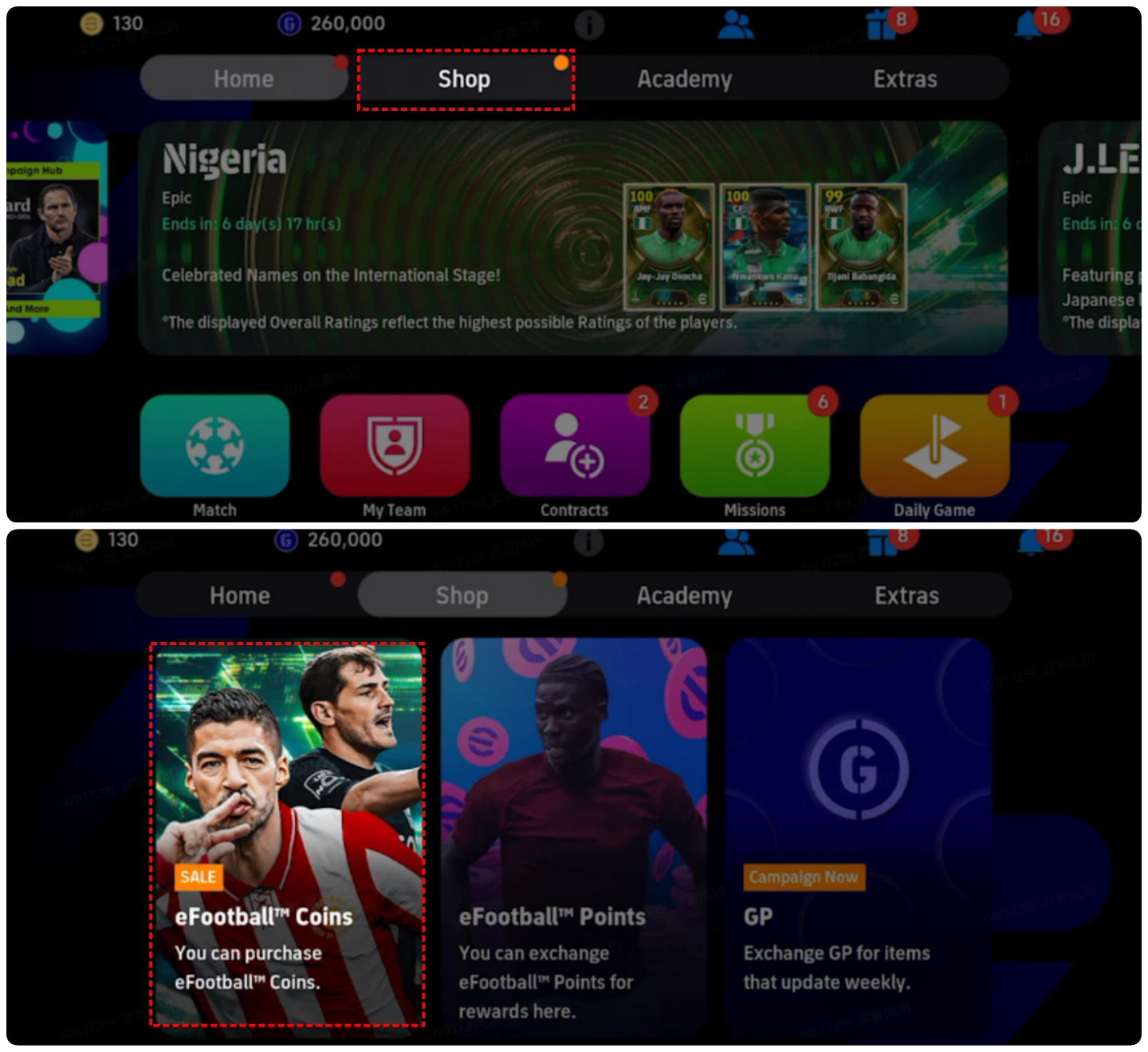
3. Find and redeem your package. Locate the in-game package that matches your LootBar order, confirm the package information, and select Redeem to claim it.
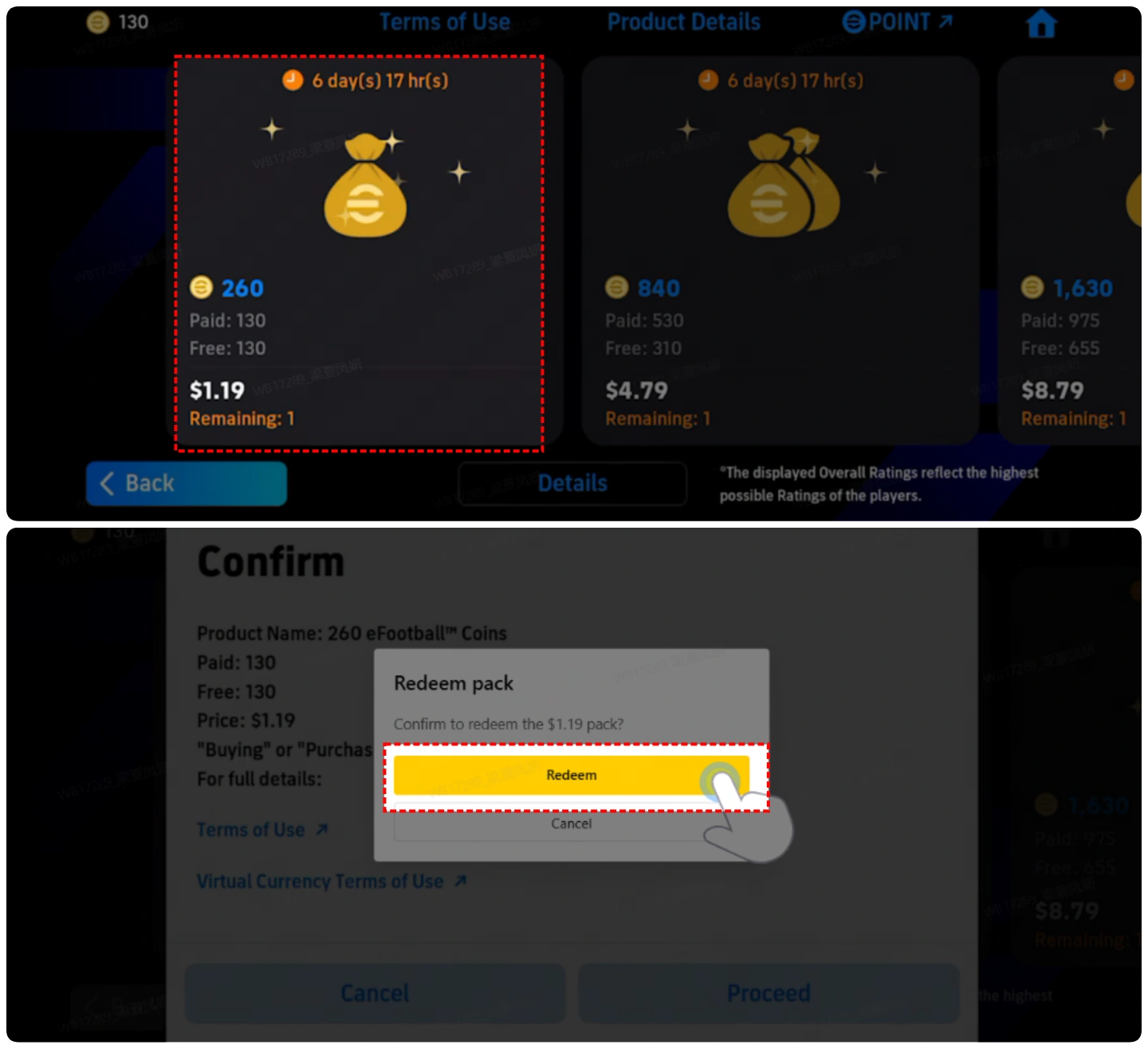
4. Wait for the recharge to complete. Redeeming the package may take a short time. Keep the Self-TopUp interface open and do NOT log in to the same eFootball account from another device or location while the top-up is being processed.
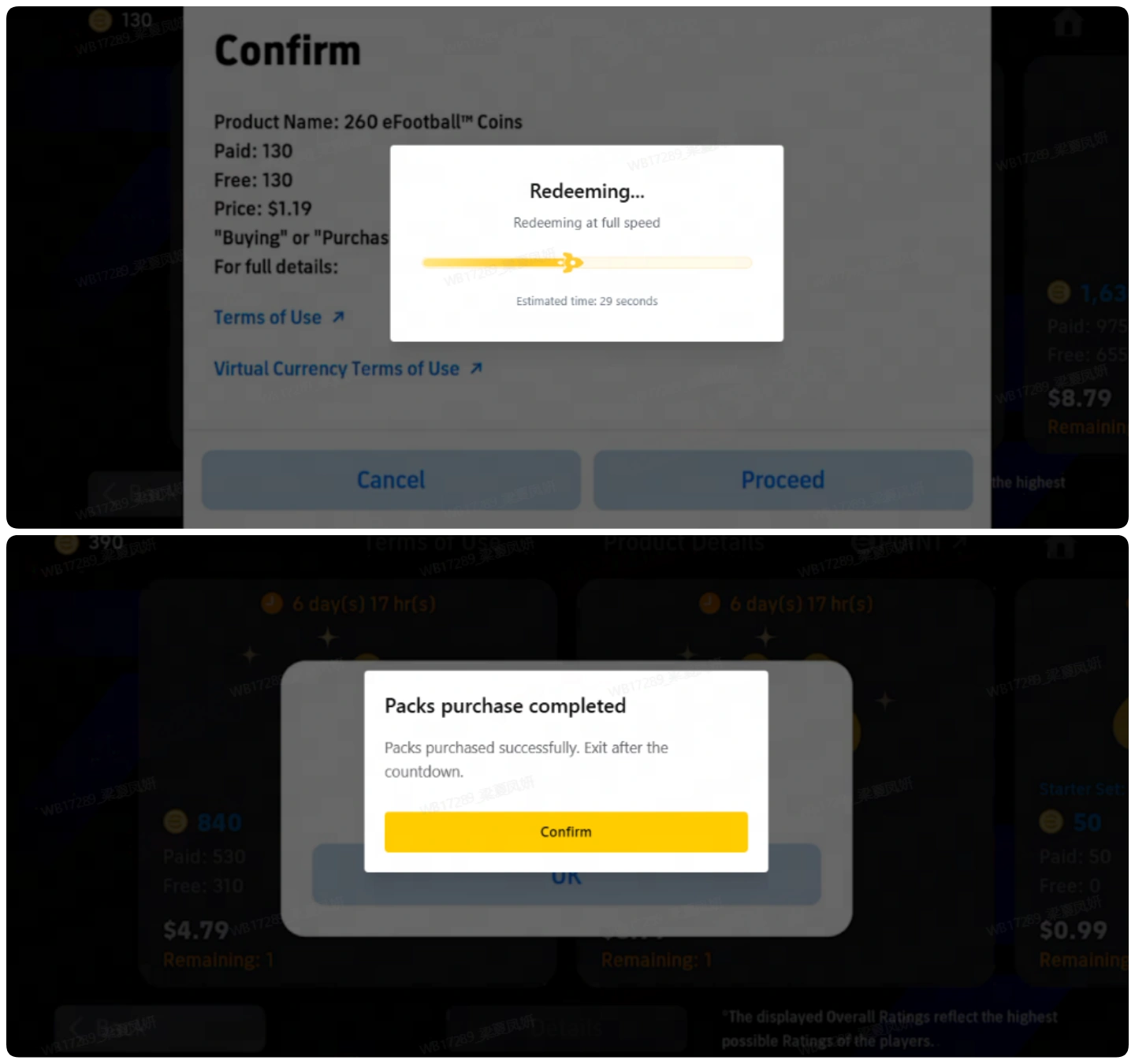
5. Verify your eFootball recharge. LootBar will notify you once the recharge is complete. You can then log back in to eFootball and check that your purchase has been successfully credited. When you exit the Self-TopUp interface, your login information will be cleared automatically.
Note:
1. All item prices in the Self-TopUp interface are shown in USD. If the LootBar page is currently displaying prices in a different currency, switch it to USD to compare prices accurately before starting the top-up process. In the eFootball store within Self-TopUp, you can then select any available bundle with an equivalent USD value to complete the recharge.
2. If you experience any issues while using Self-TopUp, please contact LootBar customer service with your account information for assistance.
3.Please note the monthly data‑transfer limit: 10 times per account per month. Redemption will not be available once this limit is exceeded.
What is eFootball?
eFootball delivers free-to-play, console-quality football on mobile. Build your Dream Team by signing superstars and legends, train and develop players, and compete in online matches with weekly Live Updates and seasonal events. Learn with tutorials, customise your stadium, and chase glory worldwide.
What are eFootball Coins?
Efootball Coins serve as the premium currency, letting you unlock top player packs, Special Player List signings, Match Pass upgrades and time-limited offers. Spend Coins to accelerate squad building, snap up featured stars when they appear, and access exclusive items and events that keep your team ahead of the meta. While other resources support routine training and day-to-day management, Coins deliver immediate impact and choice, turning big moments into instant gains. Save them for banner signings or invest steadily to keep your club evolving every season.
Why Buying eFootball Coins Is Necessary?
Efootball Coins serve as the premium currency that unlocks elite squad upgrades and exclusive content in Efootball. For players seeking to accelerate their progress in Efootball, purchasing Efootball Coins is essential.
- Sign featured players and limited-time player packs to boost team strength fast.
- Advance Match Pass tiers to claim additional premium rewards sooner.
- Access special items that support training and squad development for long-term growth.
How to Get eFootball Coins?
Players can obtain Efootball Coins by the following methods:
- Login Campaigns and Events: Claim Efootball Coins from seasonal login rewards, celebratory campaigns, and limited-time event milestones.
- Missions and Objectives: Complete featured challenges and weekly objectives when they list Efootball Coins among the rewards.
- Official Giveaways: Check announcements, maintenance compensation, and social media promotions for occasional Efootball Coin distributions.
While Efootball Coins can be obtained through free methods such as events and campaigns, paid channels remain the most efficient and reliable way to secure large amounts. For players seeking a trusted option, LootBar stands out as the preferred top-up platform offering seamless transactions, exclusive deals, and a secure purchasing experience. The official in-game store is also available as a convenient alternative for purchasing Efootball Coins.
Why Lootbar.com Is the Right Choice for You
LootBar is a global platform for game top-ups and item trading, offering secure transactions and broad game coverage for players worldwide. We partner with leading game publishers and support over 100 applications with multi-language top-ups, including FC26, Madden NFL 26, and NBA 2K26. To see all supported games, visit the LootBar Game Top-Up page.
On LootBar, you can count on the following services:
1. Secure Transactions
LootBar supports over 60 global payment methods, including PayPal, Visa, and MasterCard, making Efootball recharge simple and flexible. All Efootball top-up transactions are protected by bank-level encryption, PCI DSS-certified channels, and advanced anti-fraud systems, ensuring Efootball Coins recharge is always secure and reliable.
2. Instant Delivery
Top up Efootball on LootBar and receive your rewards instantly—no waiting. Buy Efootball Coins fast and enhance your Efootball experience right away.
3. Exclusive Offers
Choose LootBar to access exclusive promotions, bonus rewards, and limited-time deals during Efootball top-up.
4. 24/7 Customer Support
Our dedicated support team is available around the clock to assist with any questions or issues, ensuring a smooth recharge experience. If you have any questions about the Efootball top-up, please feel free to contact our support team.
Explore More Sports & Competitive Games on LootBar
The squad-building depth and live-season excitement of eFootball translate seamlessly into other sports titles vying for your competitive edge. Football fans looking to expand their pitch experience can grab a FC Mobile recharge to build an ultimate squad in EA SPORTS FC Mobile, while basketball enthusiasts should pick up a Dunk City Dynasty top up to recruit star players and dominate streetball courts in Dunk City Dynasty's fast-paced 3v3 action.
Beyond the pitch and the court, anime-driven sports fans can invest in a Haikyuu Fly High top up to unlock iconic Karasuno players and relive intense volleyball rallies in HAIKYU!! FLY HIGH. And if you crave adrenaline off the field entirely, grab some Racing Master gems to collect licensed supercars and tune your garage in Racing Master's hyper-realistic motorsport experience — all available on LootBar with instant delivery and competitive pricing to keep you ahead of the competition.
How to Top Up eFootball on LootBar?
- Go to the official LootBar website (https://www.lootbar.com/), select your preferred language and currency, and log in to your account.
- From the Home page, choose Game Top-up > Efootball.
- Select the Efootball package and the amount of Efootball Coins you want, then click Top-up Now.
- Choose your preferred payment method and click Pay Now to complete the transaction.
- Enter your game login details—Login Method, Account, and Password—to ensure the top-up is successfully credited.
User Reviews
5.0
852 reviews
5 stars
99%
4 stars
1%
3 stars
0%
2 stars
0%
1 star
0%
All reviews
Image
Latest
Most Helpful
StormShadow
Aug 31, 2026
Purchased 550 Coins
Good
Original Text
Helpful
Houssam
Aug 31, 2026
Purchased 50 Coins+Starter Set: Luis Suarez
Very excellent and fast
Original Text
Helpful
U1061358152
Aug 30, 2026
Purchased 50 Coins+Starter Set: Luis Suarez
5
Original Text
Helpful
Trustpilot
Order Information
Product130+130 Coins
Quantity
Price
$0.98
Cart
0