



Game Kingdom
Instant Activation via LootBar
Product Details
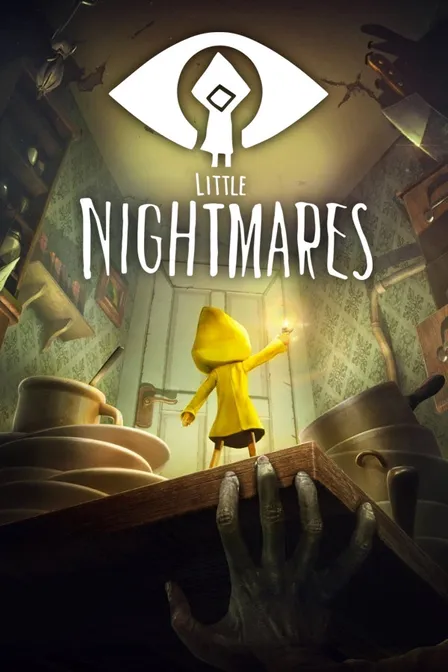
About the Little Nightmares
Little Nightmares is a 2.5D puzzle‑platform horror adventure in third person. As Six, a small child on the Maw, a colossal metal vessel of warped adults, you navigate a dark, whimsical world where everyday things become threats.
Observe, sneak, and improvise. With only a lighter, climb drawers and shelves to reach child‑size routes and stay quiet. Residents hunt by sound, so create distractions or run when cornered. Each new compartment remixes hazards and timing, keeping tension sharp.
Choices of when to hide, sprint, or spark a light shape close calls and pacing. The appeal is a vulnerable viewpoint and wordless storytelling, where scale, sound, and shadow lead your escape from the Maw, turning careful play into a personal survival tale.

What is the Little Nightmares key?
Steam game key is an official activation code that allows you to activate and play the game
on related platform after purchase. You can choose self-activation to directly add the game to your game
library, or use the traditional method by obtaining the Steam game key and activate it according to the
activation guide..
Little Nightmares Review
Little Nightmares delivers tense stealth-platforming through grotesque, diorama-like spaces, sustained by evocative art direction and unnerving sound. Pacing is taut and set-pieces memorable; its brief runtime is a drawback, yet atmosphere and visual storytelling leave a lasting chill.
System Requirements
User Reviews

FAQ
How do I activate my Little Nightmares key on Steam?
After purchase, you’ll receive your Little Nightmares game key from your email or LootBar system Notification. Log in to Steam client, click the Games menu option at the top of the client. Then choose Activate a Product on Steam... Finally, follow the onscreen instructions to complete the process. Or you can directly visit Steam to activate Little Nightmares. Alternatively, Use LootBar self-activate service,
Is this Little Nightmares key region locked?
There is region lock for Little Nightmares. Please refer to the game description for specific supported regions.
Which platforms does Little Nightmares support?
PC, PS4, Xbox One, Nintendo Switch, Mobile
Does Little Nightmares support cross-platform compatibility?
Little Nightmares does not support cross-platform compatibility or cross-play; it is a single-player experience only. No platforms can play together online. The Steam listing shows only Single-player features and lacks any multiplayer, online co-op, or cross-platform multiplayer options, so cross-play is not applicable.
Does Little Nightmares support cross-save features?
Little Nightmares does not support cross-save or cross-progression between different platforms. On Steam, saves sync only via Steam Cloud across Windows PCs when using the same Steam account; no cross-platform progression is advertised.
Does Little Nightmares have multiplayer features?
Little Nightmares does not support multiplayer. The Steam store lists only Single-player and no local or online co-op modes. It is designed as a solo experience centered on stealth and puzzle-platforming.
Are the Little Nightmares key official?
Yes, all Little Nightmares key sold on LootBar are official and sourced directly from authorized distributors.
Which countries and regions is Little Nightmares most popular in?
China, United States, Russia, Germany, United Kingdom, Brazil, Turkey, Japan, South Korea, France
Why buy Little Nightmares key on LootBar?
LootBar guarantees you a smooth and secure shopping experience when purchasing Little Nightmares keys.
1. Instant Delivery. Your game key is sent to you within 3 minutes after purchase, so you can dive into the action without delay.
2. Activation Guarantee. Every Little Nightmares key is 100% genuine and backed by our assurance of successful activation.
3. 24/7 customer support. Need help at any hour? Our professional customer support is available 24/7 to assist you with any purchase questions or issues.
How to buy Little Nightmares key on LootBar?
1. Log in to your LootBar account, or sign up if you don’t already have one.
2. In the top menu, select “Game keys” and then choose “Little Nightmares”.
3. Pick the game key you wish to purchase.
4. Click “Buy Now”, select your payment method, and confirm the payment.
5. Provide the required details and wait for the delivery.
Game Kingdom